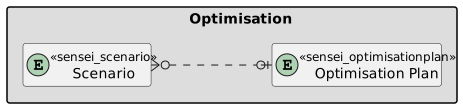
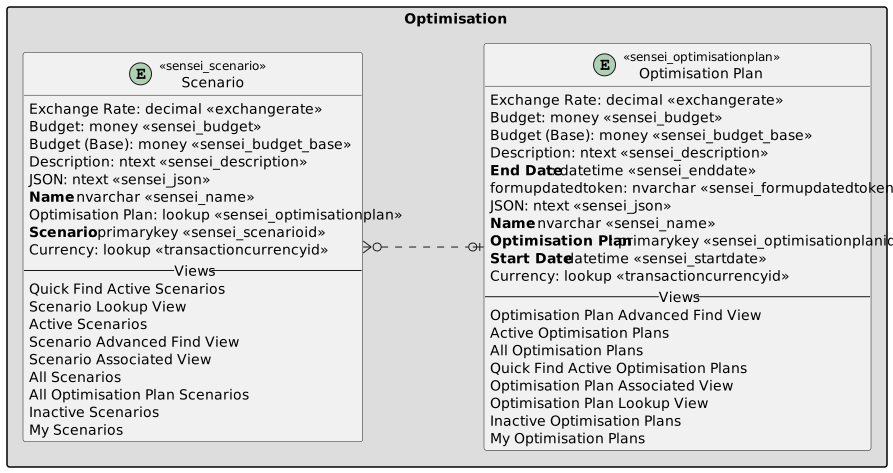
Optimisation
Overview
The Optimisation feature in Altus enables you to find the best combination of initiatives that maximises strategic value within your time and financial constraints. It allows you to explore different portfolio planning scenarios and identify the optimal mix to best serve your organisation’s needs.
Views
Optimisations is a view accessible from the Strategy menu.
Optimisation Forms
To create an Optimisation Plan, click New Optimisation Plan and fill in the required details.

After entering the Optimisation Plan details, you can create a scenario.

Next, select the initiatives you want to include in your scenario.

Once you apply your selections, the chosen initiatives will be added to the scenario.

You can drag initiatives between the IN and OUT groups to determine which initiatives' financials are included in the Horizon Forecast.

Columns
Optimisation Plan
The following columns exists in Altus.
Columns prefixed with sensei_ are those that form part of the Altus solution.
The remaining are default dataverse fields created automatically.
| Property | Value |
|---|---|
| Display Name | Optimisation Plan |
| Name | sensei_optimisationplan |
| Primary Column | Name |
| Description |
| Display Name | Name | Data type | Field Length | Customizable | Required | Searchable |
|---|---|---|---|---|---|---|
| Budget | sensei_budget |
Currency | 0 to 922337203685477 | True | False | False |
| Budget (Base) | sensei_budget_Base |
Currency | True | False | False | |
| Created By | CreatedBy |
Lookup | True | False | False | |
| Created By (Delegate) | CreatedOnBehalfBy |
Lookup | True | False | False | |
| Created On | CreatedOn |
Date and Time | Date and Time | True | False | False |
| Currency | TransactionCurrencyId |
Lookup | True | False | False | |
| Description | sensei_description |
Multiple lines of text | 4000 | True | False | False |
| End Date | sensei_enddate |
Date and Time | Date Only | True | True | False |
| Exchange Rate | ExchangeRate |
Decimal | True | False | False | |
| formupdatedtoken | sensei_formupdatedtoken |
Single line of text | 100 | True | False | False |
| Import Sequence Number | ImportSequenceNumber |
Whole number | True | False | False | |
| JSON | sensei_json |
Multiple lines of text | 1048576 | True | False | False |
| Modified By | ModifiedBy |
Lookup | True | False | False | |
| Modified By (Delegate) | ModifiedOnBehalfBy |
Lookup | True | False | False | |
| Modified On | ModifiedOn |
Date and Time | Date and Time | True | False | False |
| Name (Primary name column) | sensei_name |
Single line of text | 500 | True | True | True |
| Optimisation Plan | sensei_optimisationplanId |
Primary Key | True | False | False | |
| Owner | OwnerId |
Owner | True | False | False | |
| Owning Business Unit | OwningBusinessUnit |
Lookup | True | False | False | |
| Owning Team | OwningTeam |
Lookup | True | False | False | |
| Owning User | OwningUser |
Lookup | True | False | False | |
| Record Created On | OverriddenCreatedOn |
Date and Time | Date Only | True | False | False |
| Start Date | sensei_startdate |
Date and Time | Date Only | True | True | False |
| Status | statecode |
Choice | True | False | False | |
| Status Reason | statuscode |
Choice | True | False | False | |
| Time Zone Rule Version Number | TimeZoneRuleVersionNumber |
Whole number | -1 to 2147483647 | True | False | False |
| UTC Conversion Time Zone Code | UTCConversionTimeZoneCode |
Whole number | -1 to 2147483647 | True | False | False |
Scenario
The following columns exists in Altus.
Columns prefixed with sensei_ are those that form part of the Altus solution.
The remaining are default dataverse fields created automatically.
| Property | Value |
|---|---|
| Display Name | Scenario |
| Name | sensei_scenario |
| Primary Column | Name |
| Description |
| Display Name | Name | Data type | Field Length | Customizable | Required | Searchable |
|---|---|---|---|---|---|---|
| Budget | sensei_budget |
Currency | 0 to 922337203685477 | True | False | False |
| Budget (Base) | sensei_budget_Base |
Currency | True | False | False | |
| Created By | CreatedBy |
Lookup | True | False | False | |
| Created By (Delegate) | CreatedOnBehalfBy |
Lookup | True | False | False | |
| Created On | CreatedOn |
Date and Time | Date and Time | True | False | False |
| Currency | TransactionCurrencyId |
Lookup | True | False | False | |
| Description | sensei_description |
Multiple lines of text | 4000 | True | False | False |
| Exchange Rate | ExchangeRate |
Decimal | True | False | False | |
| Import Sequence Number | ImportSequenceNumber |
Whole number | True | False | False | |
| JSON | sensei_json |
Multiple lines of text | 1048576 | True | False | False |
| Modified By | ModifiedBy |
Lookup | True | False | False | |
| Modified By (Delegate) | ModifiedOnBehalfBy |
Lookup | True | False | False | |
| Modified On | ModifiedOn |
Date and Time | Date and Time | True | False | False |
| Name (Primary name column) | sensei_name |
Single line of text | 500 | True | True | True |
| Optimisation Plan | sensei_optimisationplan |
Lookup | True | False | False | |
| Owner | OwnerId |
Owner | True | False | False | |
| Owning Business Unit | OwningBusinessUnit |
Lookup | True | False | False | |
| Owning Team | OwningTeam |
Lookup | True | False | False | |
| Owning User | OwningUser |
Lookup | True | False | False | |
| Record Created On | OverriddenCreatedOn |
Date and Time | Date Only | True | False | False |
| Scenario | sensei_scenarioId |
Primary Key | True | False | False | |
| Status | statecode |
Choice | True | False | False | |
| Status Reason | statuscode |
Choice | True | False | False | |
| Time Zone Rule Version Number | TimeZoneRuleVersionNumber |
Whole number | -1 to 2147483647 | True | False | False |
| UTC Conversion Time Zone Code | UTCConversionTimeZoneCode |
Whole number | -1 to 2147483647 | True | False | False |
Security Roles
Security Roles for Optimisation Plan
| Security Role | Create | Read | Write | Delete | Append | Append To | Assign | Share |
|---|---|---|---|---|---|---|---|---|
| Altus - Idea User |  |
 |
|
|
|
|
|
|
| Altus - PMO User |  |
|
|
|
|
|
|
|
| Altus - Portfolio Manager | |
|
|
|
|
|
|
|
| Altus - Portfolio Manager - Team | |
|
|
|
|
|
|
|
| Altus - Program Manager | |
|
|
|
|
|
|
|
| Altus - Program Manager - Team | |
|
|
|
|
|
|
|
| Altus - Proposal Manager | |
|
|
|
|
|
|
|
| Altus - Strategy Executive | |
|
|
|
|
|
|
|
| Altus Admin User | |
|
|
|
|
|
|
|
| Altus Portfolio User | |
|
|
|
|
|
|
|
| Altus Project Executive | |
|
|
|
|
|
|
|
| Altus Project User | |
|
|
|
|
|
|
|
| Altus Strategy User |  |
|
|
|
|
|
|
|
Legend
 Organisation / Global
 Business Unit / Local
 User / Basic
 None
None
For details see Application Security.
Security Roles for Scenario
| Security Role | Create | Read | Write | Delete | Append | Append To | Assign | Share |
|---|---|---|---|---|---|---|---|---|
| Altus - Idea User | |
|
|
|
|
|
|
|
| Altus - PMO User | |
|
|
|
|
|
|
|
| Altus - Portfolio Manager | |
|
|
|
|
|
|
|
| Altus - Portfolio Manager - Team | |
|
|
|
|
|
|
|
| Altus - Program Manager | |
|
|
|
|
|
|
|
| Altus - Program Manager - Team | |
|
|
|
|
|
|
|
| Altus - Proposal Manager | |
|
|
|
|
|
|
|
| Altus - Strategy Executive | |
|
|
|
|
|
|
|
| Altus Admin User | |
|
|
|
|
|
|
|
| Altus Portfolio User | |
|
|
|
|
|
|
|
| Altus Project Executive | |
|
|
|
|
|
|
|
| Altus Project User | |
|
|
|
|
|
|
|
| Altus Strategy User | |
|
|
|
|
|
|
|
Legend
- Organisation / Global
- Business Unit / Local
- User / Basic
- None
For details see Application Security.
Dataverse Tables
| Optimisation | Optimisation with fields |
|---|