Change Requests
Overview
Change requests are formal proposals to modify project scope, schedule, budget, or any other agreed aspects of the project. Change requests can arise for various reasons, such as changes in requirements, unforeseen issues, or shifts in organisational priorities.
The change request process typically involves:
graph LR;
  A[Request Submission] --> B[Documentation Review]-->C[Impact Analysis]-->D[Decision Making]-->E[Implementation];
Usage in Altus
Change Requests can be tracked in the following places in Altus:
Views
There are two types of views for Change Requests in Altus:
- User Views: These views show all items assigned to the current user. In addition, users with higher levels of access can view items across the portfolio.
- Object Views: These filter items based on which portfolio, program, or project they belong to automatically.
User Views
| View | Columns | Filters |
|---|---|---|
| My Active Change Requests | ID; Name; Assigned To; Due Date; Priority; Category; Status Reason; Project; Program; Portfolio | Assigned to = Current User AND Status Reason = Active |
| All Active Issues | ID; Name; Assigned To; Due Date; Priority; Category; Status Reason; Project; Program; Portfolio | Status Reason = Active |
| All Change Requests Pending Approval | ID; Name; Assigned To; Due Date; Priority; Category; Status Reason; Project; Program; Portfolio | Status Reason = Submitted |
| All Closed Change Requests | ID; Name; Assigned To; Due Date; Priority; Category; Status Reason; Project; Program; Portfolio | Status Reason = Closed |
| All Change Requests | ID; Name; Assigned To; Due Date; Priority; Category; Status Reason; Project; Program; Portfolio | None |
Object Views
These show items filtered within the context of the object. For example, the project issues view below only shows Change Requests which have a project that matches the current project:
Portfolio

Program

Project

Item Form
There are two types of items forms in Altus:
- Quick Create: This is a simple version used to create the item.
- View/Edit: Provides a full browser width version containing all fields and features.
Quick Create form

Edit Form

Change Request Widget
Within the Change Request tab in Altus is a widget that provides a visualisation of all change requests for the selected project.

This widget has the following data:
- Total number of change requests raised in the selected project.
- Total cost estimate value of all change requests in the selected currency (see below for multi-currency information).
- Count of items by status represented in a doughnut chart.
This provides some quick insights for the project executive and other users who have access to the project.
Currency support
The change request widget supports any organisational currency. In the screenshot below, this environment tracks costs and financials in Euros. As such, the total cost estimate displays the appropriate currency symbol.

Columns
The following columns exists in Altus.
Columns prefixed with sensei_ are those that form part of the Altus solution.
The remaining are default dataverse fields created automatically.
| Property | Value |
|---|---|
| Display Name | Change Request |
| Name | sensei_changerequest |
| Primary Column | Name |
| Description |
| Display Name | Name | Data type | Field Length | Customizable | Required | Searchable |
|---|---|---|---|---|---|---|
| Approved / Rejected By | sensei_ApprovedRejectedBy |
Lookup | True | False | False | |
| Approved / Rejected Date | sensei_ApprovedRejectedDate |
Date and Time | Date Only | True | False | False |
| Assigned To | sensei_AssignedTo |
Lookup | True | False | False | |
| Assumptions | sensei_Assumptions |
Multiple lines of text | 2000 | True | False | False |
| Category | sensei_Category |
picklist | True | False | False | |
| Change Request | sensei_changerequestId |
Primary Key | True | False | False | |
| Cost Estimate | sensei_CostEstimate |
Currency | True | False | False | |
| Cost Estimate (Base) | sensei_costestimate_Base |
Currency | True | False | False | |
| Cost Estimate Details | sensei_CostEstimateDetails |
Multiple lines of text | 2000 | True | False | False |
| Created By | CreatedBy |
Lookup | True | False | False | |
| Created By (Delegate) | CreatedOnBehalfBy |
Lookup | True | False | False | |
| Created On | CreatedOn |
Date and Time | Date and Time | True | False | False |
| Currency | TransactionCurrencyId |
Lookup | True | False | False | |
| Date Closed | sensei_DateClosed |
Date and Time | Date Only | True | False | False |
| Description | sensei_Description |
Multiple lines of text | 4096 | True | False | False |
| Driven By | sensei_DrivenBy |
multiselectpicklist | True | False | False | |
| Due Date | sensei_DueDate |
Date and Time | Date Only | True | False | False |
| Duration Estimate | sensei_DurationEstimate |
Whole number | True | False | False | |
| Duration Estimate Details | sensei_DurationEstimateDetails |
Multiple lines of text | 2000 | True | False | False |
| Exchange Rate | ExchangeRate |
Decimal | True | False | False | |
| ID | sensei_ID |
Single line of text | 100 | True | False | False |
| Impact on Other Projects | sensei_ImpactonOtherProjects |
Multiple lines of text | 2000 | True | False | False |
| Implementation Date | sensei_ImplementationDate |
Date and Time | Date Only | True | False | False |
| Import Sequence Number | ImportSequenceNumber |
Whole number | True | False | False | |
| Include in Program Report | sensei_includeinprogramreport |
Yes/No | True | False | False | |
| Include in PSR | sensei_includeinpsr |
Yes/No | True | False | False | |
| Modified By | ModifiedBy |
Lookup | True | False | False | |
| Modified By (Delegate) | ModifiedOnBehalfBy |
Lookup | True | False | False | |
| Modified On | ModifiedOn |
Date and Time | Date and Time | True | False | False |
| Name (Primary name column) | sensei_name |
Single line of text | 500 | True | True | True |
| Owner | OwnerId |
Owner | True | False | False | |
| Owning Business Unit | OwningBusinessUnit |
Lookup | True | False | False | |
| Owning Team | OwningTeam |
Lookup | True | False | False | |
| Owning User | OwningUser |
Lookup | True | False | False | |
| Portfolio | sensei_Portfolio |
Lookup | True | False | False | |
| Priority | sensei_Priority |
picklist | True | False | False | |
| Program | sensei_Program |
Lookup | True | False | False | |
| Project | sensei_project |
Lookup | True | False | False | |
| Record Created On | OverriddenCreatedOn |
Date and Time | Date Only | True | False | False |
| Resource Impacts | sensei_ResourceImpacts |
Multiple lines of text | 2000 | True | False | False |
| Status | statecode |
Choice | True | False | False | |
| Status Reason | statuscode |
Choice | True | False | False | |
| Time Zone Rule Version Number | TimeZoneRuleVersionNumber |
Whole number | -1 to 2147483647 | True | False | False |
| UTC Conversion Time Zone Code | UTCConversionTimeZoneCode |
Whole number | -1 to 2147483647 | True | False | False |
| Work Effort Details | sensei_WorkEffortDetails |
Multiple lines of text | 2000 | True | False | False |
| Work Effort Estimate | sensei_WorkEffortEstimate |
Whole number | True | False | False |
Change Request Category (sensei_changerequestcategory)
| Value | Label | Description |
|---|---|---|
955000000 |
Resource | |
955000001 |
Scope | |
955000002 |
Schedule | |
955000003 |
Technology | |
955000004 |
Business Process | |
955000005 |
Vendor | |
955000006 |
Management Escalation | |
955000007 |
Other |
Change Request Priority (sensei_changerequestpriority)
| Value | Label | Description |
|---|---|---|
955000001 |
High | |
955000002 |
Medium | |
955000003 |
Low |
Security Roles
| Security Role | Create | Read | Write | Delete | Append | Append To | Assign | Share |
|---|---|---|---|---|---|---|---|---|
| Altus - PMO User |  |
|
|
|
|
|
|
|
| Altus - Portfolio Manager |  |
 |
|
|
|
|
|
|
| Altus - Portfolio Manager - Team | |
|
|
|
|
|
|
|
| Altus - Program Manager | |
|
|
|
|
|
|
|
| Altus - Program Manager - Team | |
|
|
|
|
|
|
|
| Altus - Strategy Executive |  |
|
|
|
|
|
|
|
| Altus Admin User | |
|
|
|
|
|
|
|
| Altus Portfolio User | |
|
|
|
|
|
|
|
| Altus Project Executive | |
|
|
|
|
|
|
|
| Altus Project User | |
|
|
|
|
|
|
|
| Altus Strategy User | |
|
|
|
|
|
|
|
Legend
 Organisation / Global
 Business Unit / Local
 User / Basic
 None
None
For details see Application Security.
Dataverse Tables
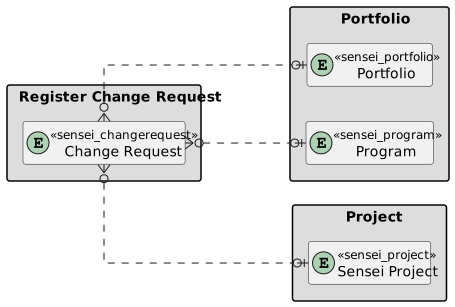
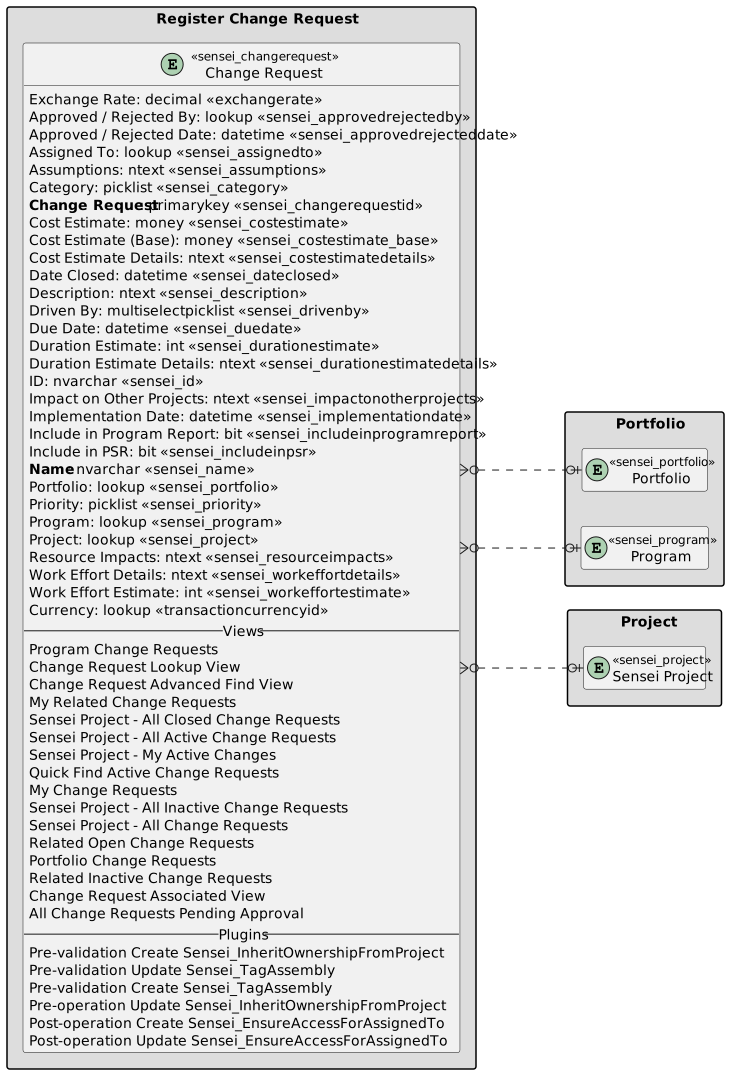
| Register Change Request | Register Change Request with fields |
|---|