Decisions
Overview
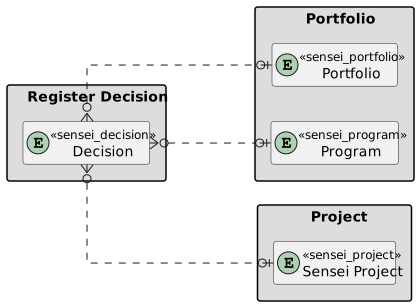
Project decisions are crucial for the success of any initiative. The decisions made throughout the lifecycle of a project can impact its outcome, timeline, and overall effectiveness. Altus enables decisions to be captured at the Portfolio, Program, and Project areas for full traceability. Examples include:
- Scope Decisions: Scope Definition: Deciding what is included and excluded from the project scope. Scope Changes: Evaluating and approving or rejecting changes to the project scope.
- Budget Decisions: Budget Allocation: Deciding how financial resources will be distributed across project activities. Cost Control: Managing and approving changes to the project budget.
- Resource Decisions: Team Composition: Deciding on the structure and composition of the project team. Resource Procurement: Determining whether to use in-house resources or external vendors.
Usage in Altus
Decisions can be tracked in the following places in Altus:
Views
There are two types of views for Decisions in Altus:
- User Views: These views show all items assigned to the current user. In addition, users with higher levels of access can view items across the portfolio.
- Object Views: These filter items based on which portfolio, program, or project they belong to automatically.
User Views

| View | Columns | Filters |
|---|---|---|
| All Decisions Assigned to Me | ID; Name; Assigned To; Due Date; Priority; Category; Status Reason; Project; Program; Portfolio | Assigned to = Current User |
| All Active Decisions | ID; Name; Assigned To; Due Date; Priority; Category; Status Reason; Project; Program; Portfolio | Status Reasons = Active |
| All Decisions | ID; Name; Assigned To; Due Date; Priority; Category; Status Reason; Project; Program; Portfolio | None |
Object Views
These show items filtered within the context of the object. For example, the project decisions view below only shows decisions which are linked to that project.
Portfolio

Program

Project

Item Form
There are two types of items forms in Altus:
- Quick Create: This is a simple version used to create the item.
- Edit: Provides a full browser width version containing all fields and features.
Quick Create form

Edit Form

Columns
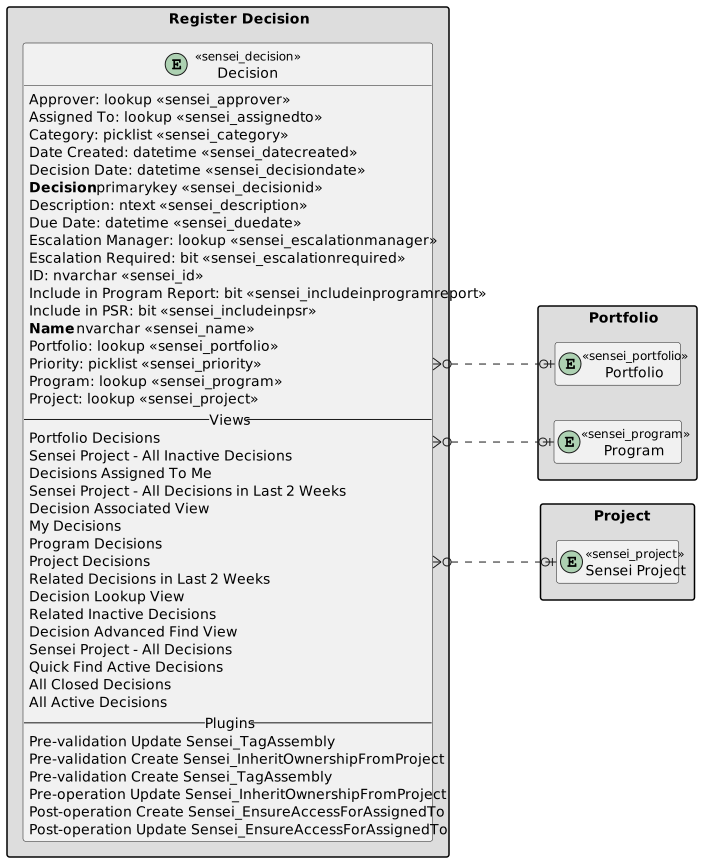
The following columns exists in Altus.
Columns prefixed with sensei_ are those that form part of the Altus solution.
The remaining are default dataverse fields created automatically.
| Property | Value |
|---|---|
| Display Name | Decision |
| Name | sensei_decision |
| Primary Column | Name |
| Description |
| Display Name | Name | Data type | Field Length | Customizable | Required | Searchable |
|---|---|---|---|---|---|---|
| Approver | sensei_approver |
Lookup | True | False | False | |
| Assigned To | sensei_AssignedTo |
Lookup | True | False | False | |
| Category | sensei_Category |
picklist | True | False | False | |
| Created By | CreatedBy |
Lookup | True | False | False | |
| Created By (Delegate) | CreatedOnBehalfBy |
Lookup | True | False | False | |
| Created On | CreatedOn |
Date and Time | Date and Time | True | False | False |
| Date Created | sensei_DateCreated |
Date and Time | Date Only | True | False | False |
| Decision | sensei_decisionId |
Primary Key | True | False | False | |
| Decision Date | sensei_decisiondate |
Date and Time | Date Only | True | False | True |
| Description | sensei_Description |
Multiple lines of text | 4096 | True | False | False |
| Due Date | sensei_DueDate |
Date and Time | Date Only | True | False | False |
| Escalation Manager | sensei_EscalationManager |
Lookup | True | False | False | |
| Escalation Required | sensei_EscalationRequired |
Yes/No | True | False | False | |
| ID | sensei_ID |
Single line of text | 100 | True | False | False |
| Import Sequence Number | ImportSequenceNumber |
Whole number | True | False | False | |
| Include in Program Report | sensei_includeinprogramreport |
Yes/No | True | False | False | |
| Include in PSR | sensei_includeinpsr |
Yes/No | True | False | False | |
| Modified By | ModifiedBy |
Lookup | True | False | False | |
| Modified By (Delegate) | ModifiedOnBehalfBy |
Lookup | True | False | False | |
| Modified On | ModifiedOn |
Date and Time | Date and Time | True | False | False |
| Name (Primary name column) | sensei_name |
Single line of text | 500 | True | True | True |
| Owner | OwnerId |
Owner | True | False | False | |
| Owning Business Unit | OwningBusinessUnit |
Lookup | True | False | False | |
| Owning Team | OwningTeam |
Lookup | True | False | False | |
| Owning User | OwningUser |
Lookup | True | False | False | |
| Portfolio | sensei_Portfolio |
Lookup | True | False | False | |
| Priority | sensei_Priority |
picklist | True | False | False | |
| Program | sensei_Program |
Lookup | True | False | False | |
| Project | sensei_project |
Lookup | True | False | False | |
| Record Created On | OverriddenCreatedOn |
Date and Time | Date Only | True | False | False |
| Status | statecode |
Choice | True | False | False | |
| Status Reason | statuscode |
Choice | True | False | False | |
| Time Zone Rule Version Number | TimeZoneRuleVersionNumber |
Whole number | -1 to 2147483647 | True | False | False |
| UTC Conversion Time Zone Code | UTCConversionTimeZoneCode |
Whole number | -1 to 2147483647 | True | False | False |
Decision Category (sensei_decisioncategory)
| Value | Label | Description |
|---|---|---|
955000000 |
Resource | |
955000001 |
Scope | |
955000002 |
Schedule | |
955000003 |
Technology | |
955000004 |
Other | |
955000005 |
Business Process | |
955000006 |
Vendor | |
955000007 |
Management Escalation |
Decision Priority (sensei_decisionpriority)
| Value | Label | Description |
|---|---|---|
955000000 |
High | |
955000001 |
Medium | |
955000002 |
Low |
Security Roles
| Security Role | Create | Read | Write | Delete | Append | Append To | Assign | Share |
|---|---|---|---|---|---|---|---|---|
| Altus - PMO User |  |
|
|
|
|
|
|
|
| Altus - Portfolio Manager |  |
 |
|
|
|
|
|
|
| Altus - Portfolio Manager - Team | |
|
|
|
|
|
|
|
| Altus - Program Manager | |
|
|
|
|
|
|
|
| Altus - Program Manager - Team | |
|
|
|
|
|
|
|
| Altus - Strategy Executive |  |
|
|
|
|
|
|
|
| Altus Admin User | |
|
|
|
|
|
|
|
| Altus Portfolio User | |
|
|
|
|
|
|
|
| Altus Project Executive | |
|
|
|
|
|
|
|
| Altus Project User | |
|
|
|
|
|
|
|
| Altus Strategy User | |
|
|
|
|
|
|
|
Legend
 Organisation / Global
 Business Unit / Local
 User / Basic
 None
None
For details see Application Security.
Dataverse Tables
| Register Decision | Register Decision with fields |
|---|