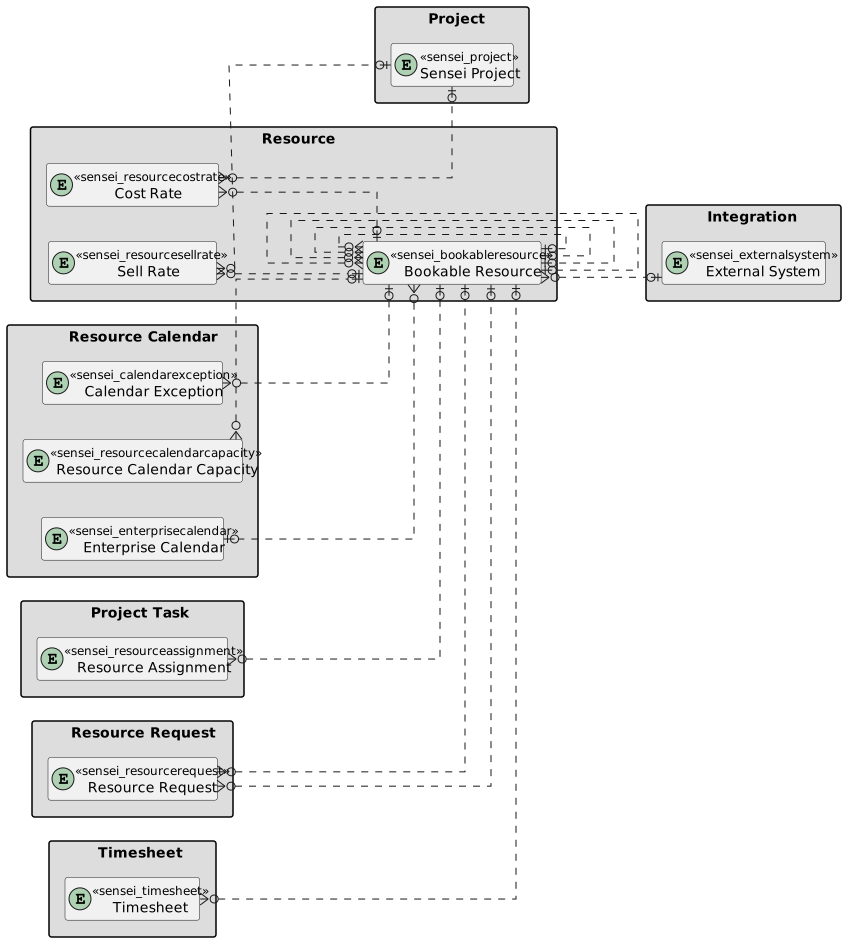
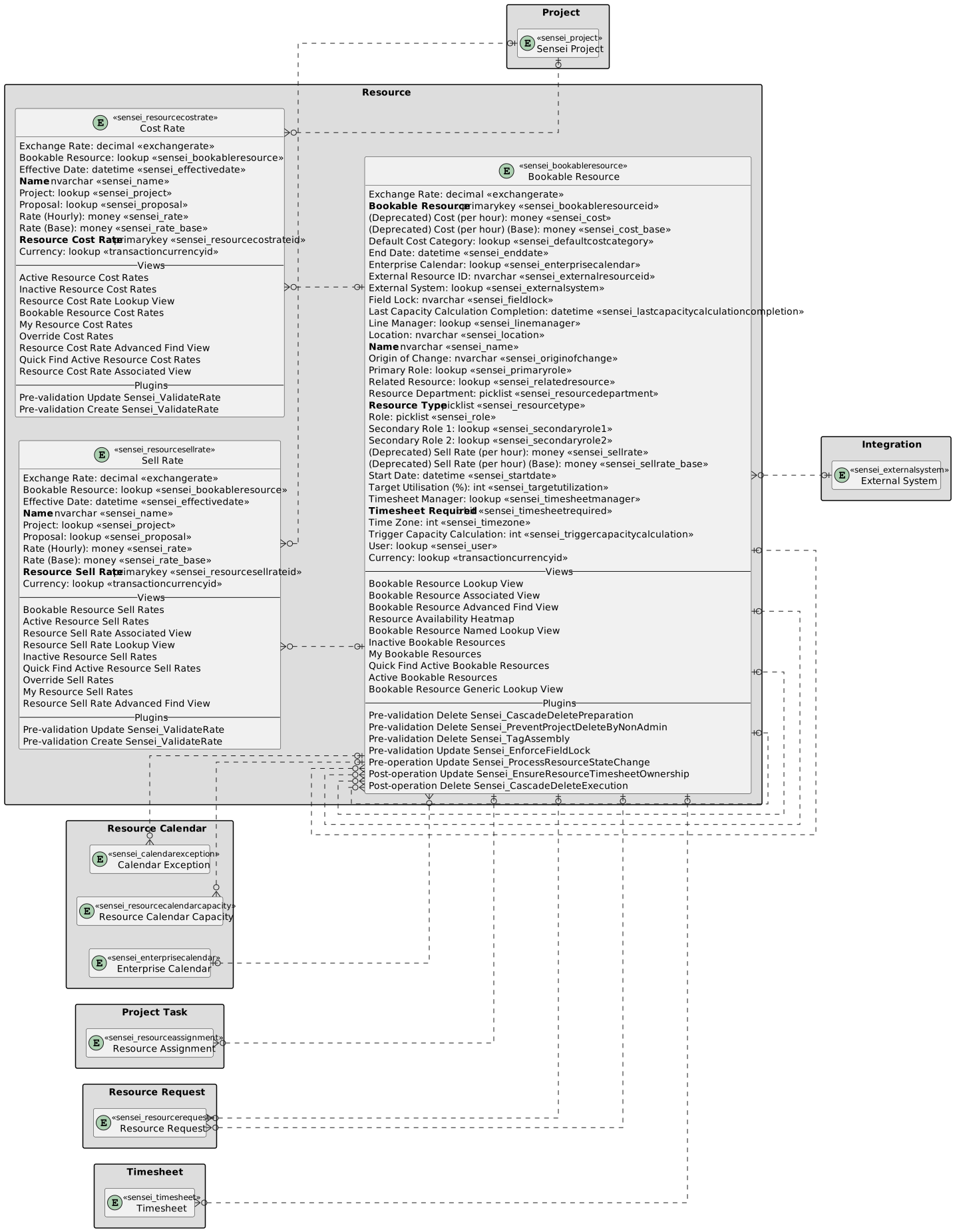
Bookable Resources
Overview
The Altus Bookable Resources feature is the Enterprise Resource Pool used for resource planning and tracking across the portfolio. This enables resource planning and tracking to occur irrespective of the external execution tool selected by the project executive.
View
Bookable Resources are accessible from Altus resources. When selected from the site map link, the view of Bookable Resources is displayed.
The default view is Active Bookable Resources, displayed below.

The following views are available:
| View | Columns | Filters |
|---|---|---|
| Active Bookable Resources | Name; Resource Type; Line Manager; Primary Role; User; Enterprise Calendar | Status = Active |
| Bookable Resource Generic Lookup View | Name; Resource Type; User; Created On | Status = Active AND Resource Type = Generic |
| Bookable Resource Named Lookup View | Name; Resource Type; User; Created On | Status = Active AND Resource Type = Named |
| Inactive Bookable Resources | Name; Resource Type | Status = Inactive |
| Resource Availability Heatmap | Resource Availability Heatmap feature | Resource Type = Named and Status = Active |
Form
New
Additional Bookable Resources can be added into Altus via the new form. The General tab is the default tab that is displayed and requires the user to populate the following fields:
- Resource Type
- User
- Name
- Required to complete timesheet
- Enterprise Calendar

General
For existing bookable resources, the General tab provides information regarding the bookable resources role, line manager, linked user account, etc.

Generic Resources
The Resource Type dropdown field is used to mark whether the resource is Named (e.g., Wade Wilson) or Generic (e.g., Business Analyst). If the Resource Type is set as Generic, the Enterprise Calendar lookup is hidden as the calendar is not relevant for generic resources.

Enterprise Calendars
All bookable resources must have an enterprise calendar associated with their profile. If this hasn't been done, the following message will be displayed when the user views this bookable resources in their Resource Plan.

For further information on Enterprise calendars, see this page in the wiki: Enterprise Calendars
Calendar Exceptions
Calendar exceptions are used to determine resource availability. These are in addition to the enterprise calendar that relates to the selected resource.
Calendar exceptions are typically used for upcoming periods of leave or times when a resource is otherwise unavailable (e.g., training, corporate shutdown periods, etc.).
These can be added using the new calendar exception sub-form.

Rates
Each bookable resource has two types of rates:
- Cost Rate: is the cost of the resource to the business. This rate should be set by the organisations Finance/HR department. This shouldn't change other than rising with new financial years
- Sell Rate: is the cost to that this resource has been sold to the project. Not all organisations will use the sell rate. Some commercial organisations do because the difference between the cost and the sell rate is the amount they are making for each hour worked. This can be changed on a project by project basis, but the base rate is also setup in the Resource and should come from Finance/HR.

Allocation
The allocation tab provides visibility of the current projects / proposals that the selected user is booked on. The row in the grid represents a single project or proposal and the hours per period that are assigned to the user:

Columns
The following columns exists in Altus.
Columns prefixed with sensei_ are those that form part of the Altus solution.
The remaining are default dataverse fields created automatically.
| Property | Value |
|---|---|
| Display Name | Bookable Resource |
| Name | sensei_bookableresource |
| Primary Column | Name |
| Description |
| Display Name | Name | Data type | Field Length | Customizable | Required | Searchable |
|---|---|---|---|---|---|---|
| (Deprecated) Cost (per hour) | sensei_cost |
Currency | True | False | False | |
| (Deprecated) Cost (per hour) (Base) | sensei_cost_Base |
Currency | True | False | False | |
| (Deprecated) Sell Rate (per hour) | sensei_sellrate |
Currency | True | False | False | |
| (Deprecated) Sell Rate (per hour) (Base) | sensei_sellrate_Base |
Currency | True | False | False | |
| Bookable Resource | sensei_bookableresourceId |
Primary Key | True | False | False | |
| Created By | CreatedBy |
Lookup | True | False | False | |
| Created By (Delegate) | CreatedOnBehalfBy |
Lookup | True | False | False | |
| Created On | CreatedOn |
Date and Time | Date and Time | True | False | False |
| Currency | TransactionCurrencyId |
Lookup | True | False | False | |
| Default Cost Category | sensei_defaultcostcategory |
Lookup | True | False | False | |
| End Date | sensei_enddate |
Date and Time | Date Only | True | False | True |
| Enterprise Calendar | sensei_enterprisecalendar |
Lookup | True | False | False | |
| Exchange Rate | ExchangeRate |
Decimal | True | False | False | |
| External Resource ID | sensei_ExternalResourceID |
Single line of text | 100 | True | False | False |
| External System | sensei_ExternalSystem |
Lookup | True | False | False | |
| Field Lock | sensei_FieldLock |
Single line of text | 4000 | True | False | False |
| Import Sequence Number | ImportSequenceNumber |
Whole number | True | False | False | |
| Last Capacity Calculation Completion | sensei_lastcapacitycalculationcompletion |
Date and Time | Date Only | True | False | True |
| Line Manager | sensei_linemanager |
Lookup | True | False | False | |
| Location | sensei_location |
Single line of text | 100 | True | False | False |
| Modified By | ModifiedBy |
Lookup | True | False | False | |
| Modified By (Delegate) | ModifiedOnBehalfBy |
Lookup | True | False | False | |
| Modified On | ModifiedOn |
Date and Time | Date and Time | True | False | False |
| Name (Primary name column) | sensei_name |
Single line of text | 358 | True | True | True |
| Origin of Change | sensei_OriginofChange |
Single line of text | 4000 | True | False | False |
| Owner | OwnerId |
Owner | True | False | False | |
| Owning Business Unit | OwningBusinessUnit |
Lookup | True | False | False | |
| Owning Team | OwningTeam |
Lookup | True | False | False | |
| Owning User | OwningUser |
Lookup | True | False | False | |
| Primary Role | sensei_primaryrole |
Lookup | True | False | False | |
| Record Created On | OverriddenCreatedOn |
Date and Time | Date Only | True | False | False |
| Related Resource | sensei_relatedresource |
Lookup | True | False | False | |
| Resource Department | sensei_resourcedepartment |
picklist | True | False | False | |
| Resource Type | sensei_resourcetype |
picklist | True | True | False | |
| Role | sensei_role |
picklist | True | False | False | |
| Secondary Role 1 | sensei_secondaryrole1 |
Lookup | True | False | False | |
| Secondary Role 2 | sensei_secondaryrole2 |
Lookup | True | False | False | |
| Start Date | sensei_startdate |
Date and Time | Date Only | True | False | True |
| Status | statecode |
Choice | True | False | False | |
| Status Reason | statuscode |
Choice | True | False | False | |
| Target Utilisation (%) | sensei_targetutilization |
Whole number | 0 to 100 | True | False | True |
| Time Zone | sensei_timezone |
Whole number | -1500 to 1500 | True | False | True |
| Time Zone Rule Version Number | TimeZoneRuleVersionNumber |
Whole number | -1 to 2147483647 | True | False | False |
| Timesheet Manager | sensei_timesheetmanager |
Lookup | True | False | False | |
| Timesheet Required | sensei_timesheetrequired |
Yes/No | True | True | False | |
| Trigger Capacity Calculation | sensei_triggercapacitycalculation |
Whole number | True | False | False | |
| User | sensei_user |
Lookup | True | False | False | |
| UTC Conversion Time Zone Code | UTCConversionTimeZoneCode |
Whole number | -1 to 2147483647 | True | False | False |
Resource Departments (sensei_resourcedepartments)
| Value | Label | Description |
|---|---|---|
955000000 |
Finance | |
955000001 |
HR | |
955000002 |
Marketing | |
955000003 |
IT | |
955000004 |
Operations | |
955000005 |
Sales | |
955000006 |
Corporate |
Resource Type (sensei_resourcetype)
| Value | Label | Description |
|---|---|---|
955000000 |
Generic | |
955000001 |
Named | |
955000002 |
External |
Role (sensei_role)
| Value | Label | Description |
|---|---|---|
955000000 |
Auditor | |
955000001 |
Business Analyst | |
955000002 |
Contractor | |
955000003 |
DBA | |
955000004 |
Developer | |
955000005 |
Infrastructure Developer | |
955000006 |
Marketing | |
955000007 |
Network Architect | |
955000008 |
Network Designer | |
955000009 |
Process Engineer | |
955000010 |
Product Tester | |
955000011 |
Project Manager | |
955000012 |
System Architect | |
955000013 |
System Tester | |
955000014 |
Technical Writer |
Security Roles
| Security Role | Create | Read | Write | Delete | Append | Append To | Assign | Share |
|---|---|---|---|---|---|---|---|---|
| Altus - Challenge User |  |
 |
|
|
|
|
|
|
| Altus - Idea User | |
|
|
|
|
|
|
|
| Altus - PMO User | |
|
|
|
|
|
|
|
| Altus - Portfolio Manager |  |
|
|
|
|
|
|
|
| Altus - Portfolio Manager - Team | |
 |
|
|
|
|
|
|
| Altus - Program Manager | |
|
|
|
|
|
|
|
| Altus - Program Manager - Team | |
|
|
|
|
|
|
|
| Altus - Proposal Manager | |
|
|
|
|
|
|
|
| Altus - Resource Manager | |
|
|
|
|
|
|
|
| Altus - Resource Organizational Access | |
|
|
|
|
|
|
|
| Altus - Strategy Executive | |
|
|
|
|
|
|
|
| Altus - Timesheet Manager | |
|
|
|
|
|
|
|
| Altus Admin User | |
|
|
|
|
|
|
|
| Altus Portfolio User | |
|
|
|
|
|
|
|
| Altus Project Executive | |
|
|
|
|
|
|
|
| Altus Project User | |
|
|
|
|
|
|
|
| Altus Strategy User | |
|
|
|
|
|
|
|
Legend
 Organisation / Global
 Business Unit / Local
 User / Basic
 None
None
For details see Application Security.
Dataverse Tables
| Resource | Resource with fields |
|---|