Benefits
Overview
The benefits of a project can vary depending on the nature, goals, and objectives of the project. However, in general, successful projects often yield several common benefits. Here are some key project benefits:
- Improved Efficiency: Projects often involve streamlining processes, implementing new technologies, or optimising existing workflows. This can result in increased efficiency and productivity within an organisation.
- Cost Savings: Effective project management can help control costs and prevent overruns. By completing projects on time and within budget, organisations can realise cost savings.
- Enhanced Quality: Projects focused on improving products, services, or processes can lead to higher quality outcomes. Rigorous project management methodologies help ensure that quality standards are met or exceeded.
Benefits are positive outcomes or advantages that result from the successful completion of a project. Identifying, measuring, and communicating these benefits is crucial for evaluating the project's success and demonstrating its value to stakeholders. Altus also enables benefits to be captured at the portfolio level and directly linked back to Strategic Goals to identify how well corporate strategies are being delivered on.
Examples of benefits include:
- Financial Benefits: Cost Savings: Reduction in operational costs, improved efficiency, or the elimination of unnecessary expenses. Revenue Generation: Increase in sales, market share, or profits as a result of the project.
- Strategic Benefits: Market Expansion: Entry into new markets or expansion of the organization's presence in existing markets. Competitive Advantage: Improved position relative to competitors through innovation, differentiation, or efficiency gains.
- Technology Advancements: Innovation: Introduction of new technologies or processes that lead to innovation. Infrastructure Enhancement: Upgrades to technological infrastructure that improves overall capabilities.
Views
Below is an example of the default All Benefits view. This is the default view in Altus and has a hard filter to only show Active items:
- Existing columns can be added to the view by clicking on Edit Columns.
- View filters can be changed using Edit Filters.

Item Form
Below is the new/edit form for Benefits. It has three tabs within it:
- Details
- Strategic Goal/Metrics
- Benefits Tracking
New Form

Details Tab
The details tab contains the benefit summary information:

Strategic Goal/Metrics tab
This tab has information regarding the Strategic Goal that the benefit relates to:

Benefits Tracking
This tab is used to measure how the benefit is performing against original planned targets:

Benefits Process
Process Diagram
The diagram below articulates the Benefits process flow.

Business Process Flow (BPF)
Benefits have the following approval process which are controlled by a business process flow. The process has four steps:

Identify
This step in the process involves the owner updating the benefits details and defining the outputs and outcomes.

Plan
This step in the process involves defining the strategy metrics and update intervals.

Execute
This step in the process involves defining the benefit tracking information.

Sustain
This step in the process involves updating the benefit tracking information.

Columns
Benefit
The following columns exists in Altus.
Columns prefixed with sensei_ are those that form part of the Altus solution.
The remaining are default dataverse fields created automatically.
| Property | Value |
|---|---|
| Display Name | Benefit |
| Name | sensei_benefit |
| Primary Column | Name |
| Description |
| Display Name | Name | Data type | Field Length | Customizable | Required | Searchable |
|---|---|---|---|---|---|---|
| (Deprecated) Stage Id | stageid |
uniqueidentifier | False | False | False | |
| (Deprecated) Traversed Path | traversedpath |
Single line of text | 1250 | False | False | False |
| Assumptions | sensei_objectiveassumptions |
Multiple lines of text | 2000 | True | False | False |
| Benefit | sensei_benefitId |
Primary Key | True | False | False | |
| Benefit Goal Value | sensei_benefitgoalvalue |
Decimal | True | False | False | |
| Benefit Impact | sensei_financialbenefit |
picklist | True | False | False | |
| Category | sensei_category |
picklist | True | False | False | |
| Created By | CreatedBy |
Lookup | True | False | False | |
| Created By (Delegate) | CreatedOnBehalfBy |
Lookup | True | False | False | |
| Created On | CreatedOn |
Date and Time | Date and Time | True | False | False |
| Cumulative Measure | sensei_cumulativemeasure |
Yes/No | True | False | False | |
| Department | sensei_department |
picklist | True | False | False | |
| Dependencies | sensei_objectivedependencies |
Multiple lines of text | 2000 | True | False | False |
| Description | sensei_description |
Multiple lines of text | 2000 | True | False | False |
| Direct | sensei_direct |
Yes/No | True | False | False | |
| Finish | sensei_finish |
Date and Time | Date Only | True | False | True |
| Goal | sensei_objectivegoal |
Multiple lines of text | 2000 | True | False | False |
| Import Sequence Number | ImportSequenceNumber |
Whole number | True | False | False | |
| Investment Category | sensei_investmentcategory |
picklist | True | False | False | |
| Location | sensei_location |
picklist | True | False | False | |
| Modified By | ModifiedBy |
Lookup | True | False | False | |
| Modified By (Delegate) | ModifiedOnBehalfBy |
Lookup | True | False | False | |
| Modified On | ModifiedOn |
Date and Time | Date and Time | True | False | False |
| Name (Primary name column) | sensei_name |
Single line of text | 500 | True | True | True |
| Owner | OwnerId |
Owner | True | False | False | |
| Owning Business Unit | OwningBusinessUnit |
Lookup | True | False | False | |
| Owning Team | OwningTeam |
Lookup | True | False | False | |
| Owning User | OwningUser |
Lookup | True | False | False | |
| Portfolio | sensei_portfolio |
Lookup | True | False | False | |
| Process Id | processid |
uniqueidentifier | False | False | False | |
| Program | sensei_program |
Lookup | True | False | False | |
| Project | sensei_project |
Lookup | True | False | False | |
| Realised Date | sensei_realiseddate |
Date and Time | Date Only | True | False | True |
| Record Created On | OverriddenCreatedOn |
Date and Time | Date Only | True | False | False |
| Scale | sensei_scale |
picklist | True | False | False | |
| Sponsor | sensei_sponsor |
Lookup | True | False | False | |
| Start | sensei_start |
Date and Time | Date Only | True | False | True |
| Status | statecode |
Choice | True | False | False | |
| Status Reason | statuscode |
Choice | True | False | False | |
| Strategic Goal | sensei_strategicgoal |
Lookup | True | False | False | |
| Strategic Theme | sensei_strategictheme |
Lookup | True | False | False | |
| Tangible | sensei_tangible |
Yes/No | True | False | False | |
| Time Zone Rule Version Number | TimeZoneRuleVersionNumber |
Whole number | -1 to 2147483647 | True | False | False |
| Timeline | sensei_objectivetimeline |
Multiple lines of text | 2000 | True | False | False |
| Timeline | sensei_timeline |
Yes/No | True | False | False | |
| Type | sensei_type |
Yes/No | True | False | False | |
| Unit of Measure | sensei_unitofmeasure |
picklist | True | False | False | |
| Update Interval | sensei_updateinterval |
picklist | True | False | False | |
| UTC Conversion Time Zone Code | UTCConversionTimeZoneCode |
Whole number | -1 to 2147483647 | True | False | False |
Financial Benefit (sensei_financialbenefit)
| Value | Label | Description |
|---|---|---|
955000000 |
Ongoing (Sustainable) | |
955000001 |
One-Off (Discrete) | |
955000002 |
Cost Avoidance | |
955000003 |
Capability | |
955000004 |
Improvement |
Benefit Category (sensei_benefitcategory)
| Value | Label | Description |
|---|---|---|
955000000 |
Internal | |
955000001 |
External |
Department (sensei_department)
| Value | Label | Description |
|---|---|---|
955000003 |
Finance | |
955000004 |
HR | |
955000005 |
Marketing | |
955000002 |
IT | |
955000006 |
Operations | |
955000000 |
Sales | |
955000001 |
Corporate |
Investment Category (sensei_investmentcategory)
| Value | Label | Description |
|---|---|---|
955000000 |
Category 1 | |
955000001 |
Category 2 | |
955000002 |
Category 3 |
Location (sensei_location)
| Value | Label | Description |
|---|---|---|
955000000 |
Location 1 | |
955000001 |
Location 2 | |
955000002 |
Location 3 |
Comparison Operator (sensei_comparisonoperator)
| Value | Label | Description |
|---|---|---|
955000000 |
Greater or equal to | |
955000001 |
Greater than | |
955000002 |
Less than | |
955000003 |
Less than or equal to | |
955000004 |
Equal to |
Unit of Measure (sensei_unitofmeasure)
| Value | Label | Description |
|---|---|---|
955000000 |
Revenue | |
955000001 |
Cost | |
955000002 |
Percent | |
955000003 |
Number |
Update Interval (sensei_updateinterval)
| Value | Label | Description |
|---|---|---|
955000001 |
Annually | |
955000002 |
Monthly | |
955000003 |
Quarterly |
Benefit Tracking
The following columns exists in Altus.
Columns prefixed with sensei_ are those that form part of the Altus solution.
The remaining are default dataverse fields created automatically.
| Property | Value |
|---|---|
| Display Name | Benefit Tracking |
| Name | sensei_benefittracking |
| Primary Column | Benefit Tracking Entry Id |
| Description |
| Display Name | Name | Data type | Field Length | Customizable | Required | Searchable |
|---|---|---|---|---|---|---|
| Actual Value | sensei_actualvalue |
Decimal | True | False | False | |
| Benefit | sensei_benefit |
Lookup | True | True | False | |
| Benefit Tracking | sensei_benefittrackingId |
Primary Key | True | False | False | |
| Benefit Tracking Entry Id (Primary name column) | sensei_entryid |
Single line of text | 100 | True | True | True |
| Created By | CreatedBy |
Lookup | True | False | False | |
| Created By (Delegate) | CreatedOnBehalfBy |
Lookup | True | False | False | |
| Created On | CreatedOn |
Date and Time | Date and Time | True | False | False |
| Date | sensei_date |
Date and Time | Date Only | True | True | False |
| Entry Type | sensei_entrytype |
Yes/No | True | False | False | |
| Forecast Value | sensei_forecastvalue |
Decimal | True | False | False | |
| Import Sequence Number | ImportSequenceNumber |
Whole number | True | False | False | |
| Modified By | ModifiedBy |
Lookup | True | False | False | |
| Modified By (Delegate) | ModifiedOnBehalfBy |
Lookup | True | False | False | |
| Modified On | ModifiedOn |
Date and Time | Date and Time | True | False | False |
| Owner | OwnerId |
Owner | True | False | False | |
| Owning Business Unit | OwningBusinessUnit |
Lookup | True | False | False | |
| Owning Team | OwningTeam |
Lookup | True | False | False | |
| Owning User | OwningUser |
Lookup | True | False | False | |
| Planned Value | sensei_plannedvalue |
Decimal | True | False | False | |
| Record Created On | OverriddenCreatedOn |
Date and Time | Date Only | True | False | False |
| Status | statecode |
Choice | True | False | False | |
| Status Comment | sensei_statuscomment |
Multiple lines of text | 2000 | True | False | False |
| Status Reason | statuscode |
Choice | True | False | False | |
| Time Zone Rule Version Number | TimeZoneRuleVersionNumber |
Whole number | -1 to 2147483647 | True | False | False |
| Type | sensei_type |
picklist | True | False | False | |
| UTC Conversion Time Zone Code | UTCConversionTimeZoneCode |
Whole number | -1 to 2147483647 | True | False | False |
| Value | sensei_value |
Decimal | True | False | False |
Benefit Measure Type (sensei_measuretype)
| Value | Label | Description |
|---|---|---|
955000000 |
Actual | |
955000001 |
Forecast | |
955000002 |
Planned |
Benefit Outcome
The following columns exists in Altus.
Columns prefixed with sensei_ are those that form part of the Altus solution.
The remaining are default dataverse fields created automatically.
| Property | Value |
|---|---|
| Display Name | Benefit Outcome |
| Name | sensei_benefitoutcome |
| Primary Column | Name |
| Description |
| Display Name | Name | Data type | Field Length | Customizable | Required | Searchable |
|---|---|---|---|---|---|---|
| Benefit | sensei_Benefit |
Lookup | True | False | False | |
| Category | sensei_category |
picklist | True | False | False | |
| Created By | CreatedBy |
Lookup | True | False | False | |
| Created By (Delegate) | CreatedOnBehalfBy |
Lookup | True | False | False | |
| Created On | CreatedOn |
Date and Time | Date and Time | True | False | False |
| Description | sensei_description |
Multiple lines of text | 2000 | True | False | False |
| Due Date | sensei_duedate |
Date and Time | Date Only | True | False | True |
| Import Sequence Number | ImportSequenceNumber |
Whole number | True | False | False | |
| Modified By | ModifiedBy |
Lookup | True | False | False | |
| Modified By (Delegate) | ModifiedOnBehalfBy |
Lookup | True | False | False | |
| Modified On | ModifiedOn |
Date and Time | Date and Time | True | False | False |
| Name (Primary name column) | sensei_name |
Single line of text | 500 | True | True | True |
| Outcome | sensei_benefitoutcomeId |
Primary Key | True | False | False | |
| Owner | OwnerId |
Owner | True | False | False | |
| Owning Business Unit | OwningBusinessUnit |
Lookup | True | False | False | |
| Owning Team | OwningTeam |
Lookup | True | False | False | |
| Owning User | OwningUser |
Lookup | True | False | False | |
| Progress Update | sensei_progressupdate |
Multiple lines of text | 2000 | True | False | False |
| Record Created On | OverriddenCreatedOn |
Date and Time | Date Only | True | False | False |
| Status | statecode |
Choice | True | False | False | |
| Status Reason | statuscode |
Choice | True | False | False | |
| Time Zone Rule Version Number | TimeZoneRuleVersionNumber |
Whole number | -1 to 2147483647 | True | False | False |
| UTC Conversion Time Zone Code | UTCConversionTimeZoneCode |
Whole number | -1 to 2147483647 | True | False | False |
Outcome Category (sensei_outcomecategory)
| Value | Label | Description |
|---|---|---|
955000000 |
Capability | |
955000001 |
Material |
Benefit Output
The following columns exists in Altus.
Columns prefixed with sensei_ are those that form part of the Altus solution.
The remaining are default dataverse fields created automatically.
| Property | Value |
|---|---|
| Display Name | Benefit Output |
| Name | sensei_benefitoutput |
| Primary Column | Name |
| Description |
| Display Name | Name | Data type | Field Length | Customizable | Required | Searchable |
|---|---|---|---|---|---|---|
| Benefit | sensei_benefit |
Lookup | True | False | False | |
| Category | sensei_category |
picklist | True | False | False | |
| Created By | CreatedBy |
Lookup | True | False | False | |
| Created By (Delegate) | CreatedOnBehalfBy |
Lookup | True | False | False | |
| Created On | CreatedOn |
Date and Time | Date and Time | True | False | False |
| Description | sensei_description |
Multiple lines of text | 2000 | True | False | False |
| Due Date | sensei_duedate |
Date and Time | Date Only | True | False | True |
| Import Sequence Number | ImportSequenceNumber |
Whole number | True | False | False | |
| Modified By | ModifiedBy |
Lookup | True | False | False | |
| Modified By (Delegate) | ModifiedOnBehalfBy |
Lookup | True | False | False | |
| Modified On | ModifiedOn |
Date and Time | Date and Time | True | False | False |
| Name (Primary name column) | sensei_name |
Single line of text | 500 | True | True | True |
| Output | sensei_benefitoutputId |
Primary Key | True | False | False | |
| Owner | OwnerId |
Owner | True | False | False | |
| Owning Business Unit | OwningBusinessUnit |
Lookup | True | False | False | |
| Owning Team | OwningTeam |
Lookup | True | False | False | |
| Owning User | OwningUser |
Lookup | True | False | False | |
| Progress Update | sensei_progressupdate |
Multiple lines of text | 2000 | True | False | False |
| Record Created On | OverriddenCreatedOn |
Date and Time | Date Only | True | False | False |
| Status | statecode |
Choice | True | False | False | |
| Status Reason | statuscode |
Choice | True | False | False | |
| Time Zone Rule Version Number | TimeZoneRuleVersionNumber |
Whole number | -1 to 2147483647 | True | False | False |
| UTC Conversion Time Zone Code | UTCConversionTimeZoneCode |
Whole number | -1 to 2147483647 | True | False | False |
Outcome Category (sensei_outcomecategory)
| Value | Label | Description |
|---|---|---|
955000000 |
Capability | |
955000001 |
Material |
Benefit Process
The following columns exists in Altus.
Columns prefixed with sensei_ are those that form part of the Altus solution.
The remaining are default dataverse fields created automatically.
| Property | Value |
|---|---|
| Display Name | Benefit Process |
| Name | sensei_benefitprocess |
| Primary Column | Name |
| Description | Base entity for process Benefit Process |
| Display Name | Name | Data type | Field Length | Customizable | Required | Searchable |
|---|---|---|---|---|---|---|
| Active Stage | ActiveStageId |
Lookup | True | False | False | |
| Active Stage Started On | ActiveStageStartedOn |
Date and Time | Date Only | True | False | False |
| Benefit Process | BusinessProcessFlowInstanceId |
Primary Key | True | False | False | |
| Completed On | CompletedOn |
Date and Time | Date Only | True | False | False |
| Created By | CreatedBy |
Lookup | True | False | False | |
| Created By (Delegate) | CreatedOnBehalfBy |
Lookup | True | False | False | |
| Created On | CreatedOn |
Date and Time | Date and Time | True | False | False |
| Duration | bpf_Duration |
Whole number | 0 to 2147483647 | True | False | False |
| Import Sequence Number | ImportSequenceNumber |
Whole number | True | False | False | |
| Modified By | ModifiedBy |
Lookup | True | False | False | |
| Modified By (Delegate) | ModifiedOnBehalfBy |
Lookup | True | False | False | |
| Modified On | ModifiedOn |
Date and Time | Date and Time | True | False | False |
| Name (Primary name column) | bpf_name |
Single line of text | 100 | True | True | True |
| Organization Id | OrganizationId |
Lookup | True | False | False | |
| Process | ProcessId |
Lookup | True | False | False | |
| Record Created On | OverriddenCreatedOn |
Date and Time | Date Only | True | False | False |
| Sensei_Benefit | bpf_sensei_benefitid |
Lookup | True | False | False | |
| Status | statecode |
Choice | True | False | False | |
| Status Reason | statuscode |
Choice | True | False | False | |
| Time Zone Rule Version Number | TimeZoneRuleVersionNumber |
Whole number | -1 to 2147483647 | True | False | False |
| Traversed Path | TraversedPath |
Single line of text | 1250 | True | False | False |
| UTC Conversion Time Zone Code | UTCConversionTimeZoneCode |
Whole number | -1 to 2147483647 | True | False | False |
Security Roles
Security Roles for Benefit
| Security Role | Create | Read | Write | Delete | Append | Append To | Assign | Share |
|---|---|---|---|---|---|---|---|---|
| Altus - PMO User |  |
|
|
|
|
|
|
|
| Altus - Portfolio Manager |  |
 |
|
|
|
|
|
|
| Altus - Portfolio Manager - Team | |
|
|
|
|
|
|
|
| Altus - Program Manager | |
|
|
|
|
|
|
|
| Altus - Program Manager - Team | |
|
|
|
|
|
|
|
| Altus - Strategy Executive | |
|
|
|
|
|
|
|
| Altus Admin User | |
|
|
|
|
|
|
|
| Altus Portfolio User | |
|
|
|
|
|
|
|
| Altus Project Executive | |
|
|
|
|
|
|
|
| Altus Project User | |
|
|
|
|
|
|
|
| Altus Strategy User | |
|
|
|
|
|
|
|
Legend
 Organisation / Global
 Business Unit / Local
 User / Basic
 None
None
For details see Application Security.
Security Roles for Benefit Tracking
| Security Role | Create | Read | Write | Delete | Append | Append To | Assign | Share |
|---|---|---|---|---|---|---|---|---|
| Altus - PMO User | |
|
|
|
|
|
|
|
| Altus - Portfolio Manager | |
|
|
|
|
|
|
|
| Altus - Portfolio Manager - Team | |
|
|
|
|
|
|
|
| Altus - Program Manager | |
|
|
|
|
|
|
|
| Altus - Program Manager - Team | |
|
|
|
|
|
|
|
| Altus - Strategy Executive | |
|
|
|
|
|
|
|
| Altus Admin User | |
|
|
|
|
|
|
|
| Altus Portfolio User | |
|
|
|
|
|
|
|
| Altus Project Executive | |
|
|
|
|
|
|
|
| Altus Project User | |
|
|
|
|
|
|
|
| Altus Strategy User | |
|
|
|
|
|
|
|
Legend
- Organisation / Global
- Business Unit / Local
- User / Basic
- None
For details see Application Security.
Security Roles for Benefit Outcome
| Security Role | Create | Read | Write | Delete | Append | Append To | Assign | Share |
|---|---|---|---|---|---|---|---|---|
| Altus - PMO User | |
|
|
|
|
|
|
|
| Altus - Portfolio Manager | |
|
|
|
|
|
|
|
| Altus - Portfolio Manager - Team | |
|
|
|
|
|
|
|
| Altus - Program Manager | |
|
|
|
|
|
|
|
| Altus - Program Manager - Team | |
|
|
|
|
|
|
|
| Altus - Strategy Executive | |
|
|
|
|
|
|
|
| Altus Admin User | |
|
|
|
|
|
|
|
| Altus Portfolio User | |
|
|
|
|
|
|
|
| Altus Project Executive | |
|
|
|
|
|
|
|
| Altus Project User | |
|
|
|
|
|
|
|
| Altus Strategy User | |
|
|
|
|
|
|
|
Legend
- Organisation / Global
- Business Unit / Local
- User / Basic
- None
For details see Application Security.
Security Roles for Benefit Output
| Security Role | Create | Read | Write | Delete | Append | Append To | Assign | Share |
|---|---|---|---|---|---|---|---|---|
| Altus - PMO User | |
|
|
|
|
|
|
|
| Altus - Portfolio Manager | |
|
|
|
|
|
|
|
| Altus - Portfolio Manager - Team | |
|
|
|
|
|
|
|
| Altus - Program Manager | |
|
|
|
|
|
|
|
| Altus - Program Manager - Team | |
|
|
|
|
|
|
|
| Altus - Strategy Executive | |
|
|
|
|
|
|
|
| Altus Admin User | |
|
|
|
|
|
|
|
| Altus Portfolio User | |
|
|
|
|
|
|
|
| Altus Project Executive | |
|
|
|
|
|
|
|
| Altus Project User | |
|
|
|
|
|
|
|
| Altus Strategy User | |
|
|
|
|
|
|
|
Legend
- Organisation / Global
- Business Unit / Local
- User / Basic
- None
For details see Application Security.
Security Roles for Benefit Process
| Security Role | Create | Read | Write | Delete | Append | Append To | Assign | Share |
|---|---|---|---|---|---|---|---|---|
| Altus - PMO User | |
|
|
|
|
|
 |
|
| Altus - Portfolio Manager | |
|
|
|
|
|
|
|
| Altus - Portfolio Manager - Team | |
|
|
|
|
|
|
|
| Altus - Program Manager | |
|
|
|
|
|
|
|
| Altus - Program Manager - Team | |
|
|
|
|
|
|
|
| Altus - Strategy Executive | |
|
|
|
|
|
|
|
| Altus Admin User | |
|
|
|
|
|
|
|
| Altus Portfolio User | |
|
|
|
|
|
|
|
| Altus Strategy User | |
|
|
|
|
|
|
|
Legend
- Organisation / Global
- Business Unit / Local
- User / Basic
- None
For details see Application Security.
Dataverse Tables
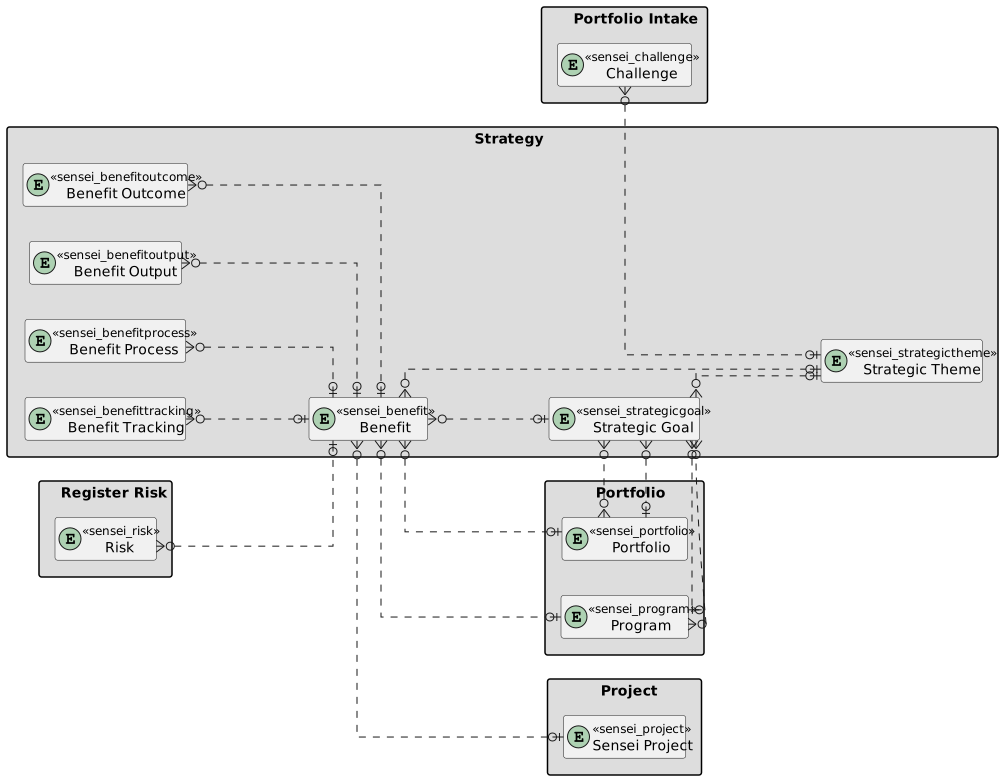
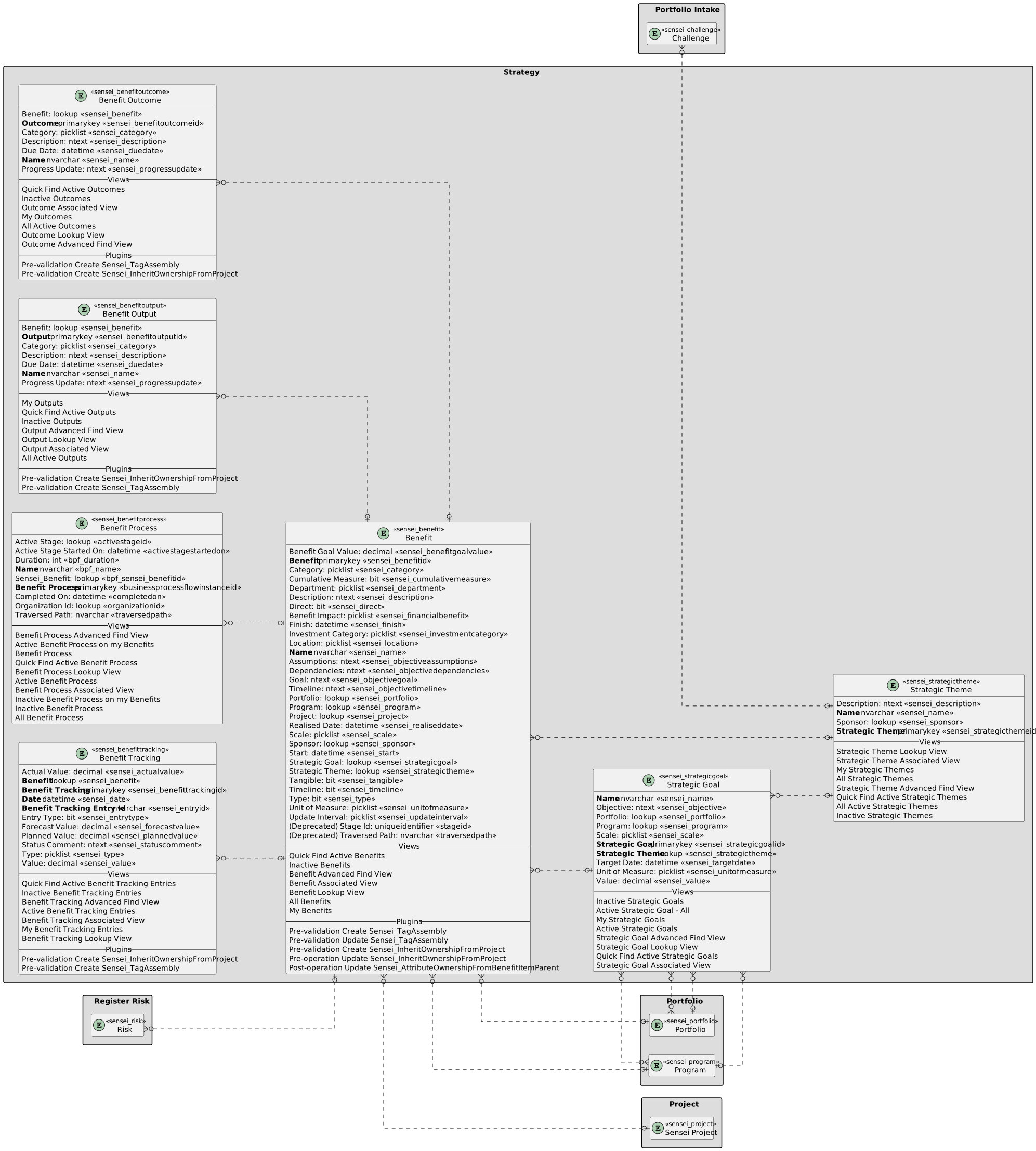
| Strategy | Strategy with fields |
|---|