Timesheets
Overview
A timesheet is a document used for tracking the amount of time an individual spends on various tasks or activities during a specific period. It is a valuable tool for project management, employee performance evaluation, and overall time management. Timesheets can be physical documents or digital tools, and they typically include the following elements:
- Employee Information: Name or identification number of the employee submitting the timesheet.
- Time Period: Start and end dates that the timesheet covers. This could be a week, bi-weekly, monthly, or any other defined time frame.
- Task/Project Description: A list of tasks or projects that the employee worked on during the specified time period. Each task is associated with a description of the work performed.
- Date and Day: A column or section indicating the date and day of the week corresponding to each entry.
- Hours Worked: The number of hours or time spent on each task for each day. This may be broken down into regular hours, overtime, or specific categories based on the nature of the work.
- Total Hours: The sum of hours worked for each task or project, as well as the total hours for the entire time period.
Views
There are two types of views for Timesheets in Altus:
- User Views: These views show all items assigned to the current user. In addition, users with higher levels of access can view items across the portfolio.
- Object Views: These filter items based on which portfolio, program, or project they belong to automatically.
User Views
The default view in Work is My Timesheets which provides the currently logged in user visibility of all the timesheets they have created.

| View | Columns | Filters |
|---|---|---|
| My Timesheets | Name; Bookable Resource; Approver Name; Start Date (Timesheet Period); Finish Date (Timesheet Period); Total Actual; Timesheet Status | Status = Active AND Bookable Resource (Bookable Resources) Contains Data AND User = Current User |
| My Current Timesheets | Opens Timesheet Form (see below for details) | N/A |
| Team Timesheets | Name; Start Date (Timesheet Period); Finish Date (Timesheet Period); Bookable Resource; Timesheet Manager (Bookable Resource); Total Actual; Total Project Hours; Total Non Project Hours; Timesheet Status; Timesheet Period | Status = Active AND Bookable Resource (Bookable Resources) Contains Data AND Timesheet Manager = Current User AND Timesheet Period (Timesheet Periods) contains data AND Status = Active |
| Team Timesheets Requiring Approval | Name; Start Date (Timesheet Period); Finish Date (Timesheet Period); Bookable Resource; Timesheet Manager (Bookable Resource); Total Actual; Total Project Hours; Total Non Project Hours; Timesheet Status; Timesheet Period | Timesheet Status = Submitted AND Status = Active AND Bookable Resource (Bookable Resources) Contains Data AND Timesheet Manager = Current User AND Timesheet Period (Timesheet Periods) contains data AND Status = Active |
Object Views
There are no out-of-the-box timesheet views in Altus PPM.
Timesheet Form
When a user selects My Timesheet from the link in Altus Work, their timesheet for the current period will be open. From here they can book time to projects / tasks that they have access to.

- Rows: The horizontal axis in the timesheet will show either Projects or Projects and Tasks (depending on which mode has been selected for time recording).
- Columns: The columns will show the total timesheet actuals per row and the week days (including dates) for time recording.
Submitting for approval
To submit a timesheet for approval, a user will need to add hours against at least one tasks for the submit for approval button to be selectable..

Timesheet Periods
Administrators of Altus have the ability to create timesheet periods and open and close these as required.

These can either be created one by one via the form below.

Or in bulk, using this feature.


Columns
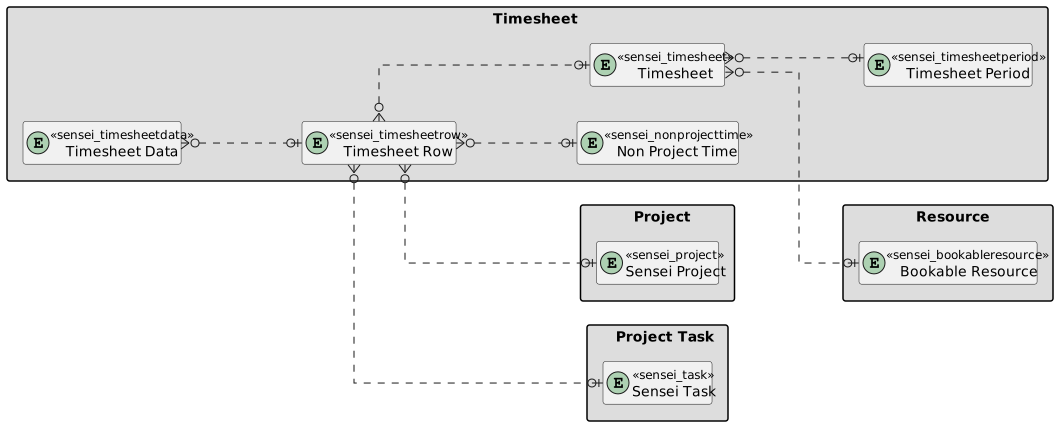
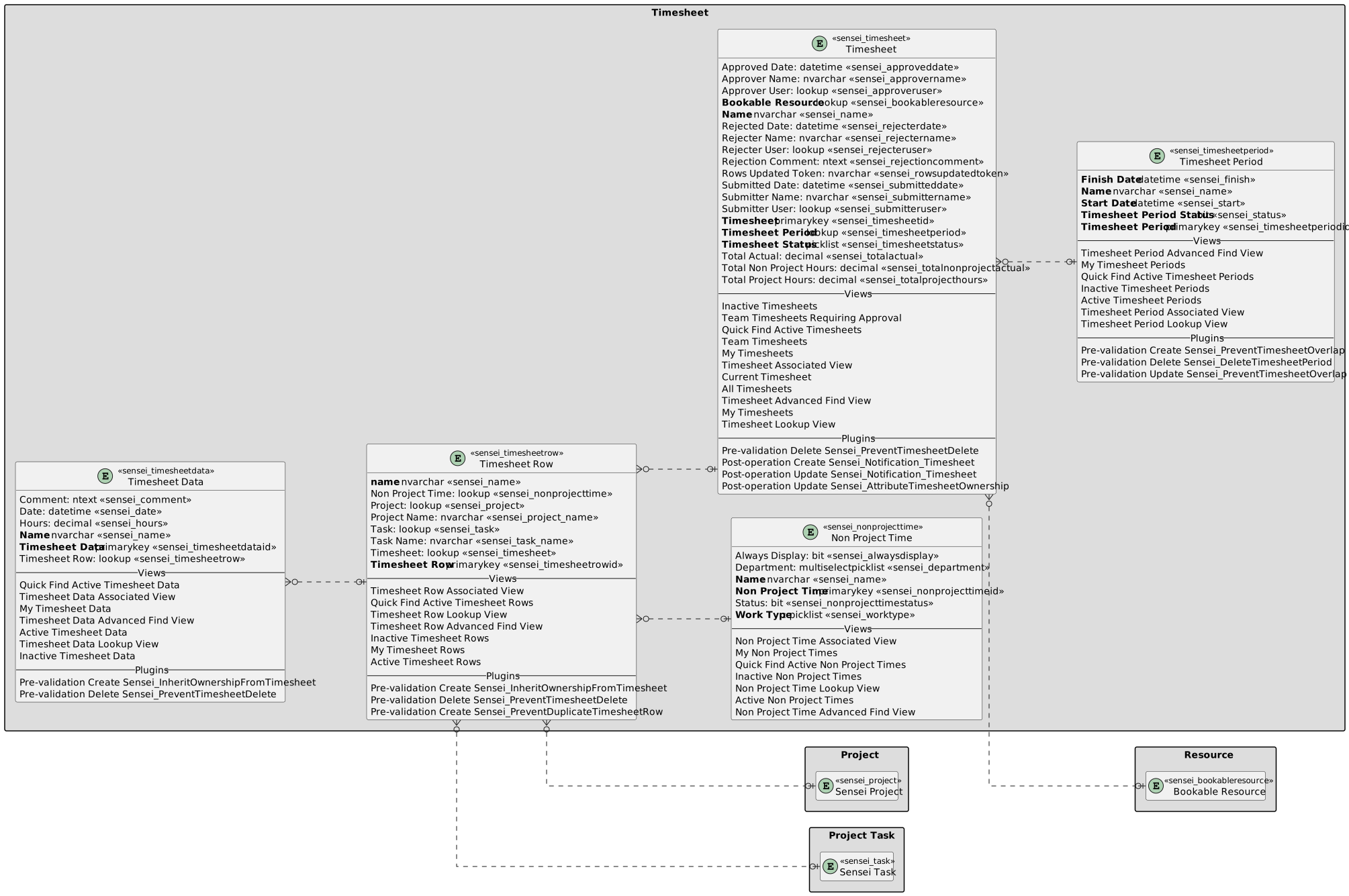
These are captured in these entities:
| Entity | Overview |
|---|---|
| Timesheet Period | Used to store the timesheet period information. These timesheet periods determine when users can submit timesheets for. |
| Timesheet | Summary of the timesheet including status and which user it belongs to. |
| Timesheet Row | The projects and tasks which the user has permissions to bill time to. |
| Timesheet Data | Actual hours booked to the timesheet/project/task. |
Timesheet Period
The following columns exists in Altus.
Columns prefixed with sensei_ are those that form part of the Altus solution.
The remaining are default dataverse fields created automatically.
| Property | Value |
|---|---|
| Display Name | Timesheet Period |
| Name | sensei_timesheetperiod |
| Primary Column | Name |
| Description |
| Display Name | Name | Data type | Field Length | Customizable | Required | Searchable |
|---|---|---|---|---|---|---|
| Created By | CreatedBy |
Lookup | True | False | False | |
| Created By (Delegate) | CreatedOnBehalfBy |
Lookup | True | False | False | |
| Created On | CreatedOn |
Date and Time | Date and Time | True | False | False |
| Finish Date | sensei_finish |
Date and Time | Date Only | True | True | True |
| Import Sequence Number | ImportSequenceNumber |
Whole number | True | False | False | |
| Modified By | ModifiedBy |
Lookup | True | False | False | |
| Modified By (Delegate) | ModifiedOnBehalfBy |
Lookup | True | False | False | |
| Modified On | ModifiedOn |
Date and Time | Date and Time | True | False | False |
| Name (Primary name column) | sensei_name |
Single line of text | 100 | True | True | True |
| Owner | OwnerId |
Owner | True | False | False | |
| Owning Business Unit | OwningBusinessUnit |
Lookup | True | False | False | |
| Owning Team | OwningTeam |
Lookup | True | False | False | |
| Owning User | OwningUser |
Lookup | True | False | False | |
| Record Created On | OverriddenCreatedOn |
Date and Time | Date Only | True | False | False |
| Start Date | sensei_start |
Date and Time | Date Only | True | True | True |
| Status | statecode |
Choice | True | False | False | |
| Status Reason | statuscode |
Choice | True | False | False | |
| Time Zone Rule Version Number | TimeZoneRuleVersionNumber |
Whole number | -1 to 2147483647 | True | False | False |
| Timesheet Period | sensei_timesheetperiodId |
Primary Key | True | False | False | |
| Timesheet Period Status | sensei_status |
Yes/No | True | True | False | |
| UTC Conversion Time Zone Code | UTCConversionTimeZoneCode |
Whole number | -1 to 2147483647 | True | False | False |
Timesheet
The following columns exists in Altus.
Columns prefixed with sensei_ are those that form part of the Altus solution.
The remaining are default dataverse fields created automatically.
| Property | Value |
|---|---|
| Display Name | Timesheet |
| Name | sensei_timesheet |
| Primary Column | Name |
| Description |
| Display Name | Name | Data type | Field Length | Customizable | Required | Searchable |
|---|---|---|---|---|---|---|
| Approved Date | sensei_approveddate |
Date and Time | Date and Time | True | False | True |
| Approver Name | sensei_approvername |
Single line of text | 256 | True | False | False |
| Approver User | sensei_approveruser |
Lookup | True | False | False | |
| Bookable Resource | sensei_bookableresource |
Lookup | True | True | False | |
| Change Set | sensei_changeset |
Multiple lines of text | 1000000 | True | False | False |
| Created By | CreatedBy |
Lookup | True | False | False | |
| Created By (Delegate) | CreatedOnBehalfBy |
Lookup | True | False | False | |
| Created On | CreatedOn |
Date and Time | Date and Time | True | False | False |
| Import Sequence Number | ImportSequenceNumber |
Whole number | True | False | False | |
| Modified By | ModifiedBy |
Lookup | True | False | False | |
| Modified By (Delegate) | ModifiedOnBehalfBy |
Lookup | True | False | False | |
| Modified On | ModifiedOn |
Date and Time | Date and Time | True | False | False |
| Name (Primary name column) | sensei_name |
Single line of text | 512 | True | True | True |
| Owner | OwnerId |
Owner | True | False | False | |
| Owning Business Unit | OwningBusinessUnit |
Lookup | True | False | False | |
| Owning Team | OwningTeam |
Lookup | True | False | False | |
| Owning User | OwningUser |
Lookup | True | False | False | |
| Record Created On | OverriddenCreatedOn |
Date and Time | Date Only | True | False | False |
| Rejected Date | sensei_rejecterdate |
Date and Time | Date and Time | True | False | True |
| Rejecter Name | sensei_rejectername |
Single line of text | 256 | True | False | False |
| Rejecter User | sensei_rejecteruser |
Lookup | True | False | False | |
| Rejection Comment | sensei_rejectioncomment |
Multiple lines of text | 2000 | True | False | False |
| Rows Updated Token | sensei_rowsupdatedtoken |
Single line of text | 100 | True | False | False |
| Status | statecode |
Choice | True | False | False | |
| Status Reason | statuscode |
Choice | True | False | False | |
| Submitted Date | sensei_submitteddate |
Date and Time | Date and Time | True | False | True |
| Submitter Name | sensei_submittername |
Single line of text | 256 | True | False | False |
| Submitter User | sensei_submitteruser |
Lookup | True | False | False | |
| Time Zone Rule Version Number | TimeZoneRuleVersionNumber |
Whole number | -1 to 2147483647 | True | False | False |
| Timesheet | sensei_timesheetId |
Primary Key | True | False | False | |
| Timesheet Period | sensei_timesheetperiod |
Lookup | True | True | False | |
| Timesheet Status | sensei_timesheetstatus |
picklist | True | True | False | |
| Total Actual | sensei_totalactual |
Decimal | True | False | False | |
| Total Non Project Hours | sensei_totalnonprojectactual |
Decimal | True | False | False | |
| Total Project Hours | sensei_totalprojecthours |
Decimal | True | False | False | |
| UTC Conversion Time Zone Code | UTCConversionTimeZoneCode |
Whole number | -1 to 2147483647 | True | False | False |
Timesheet Status (sensei_timesheetstatus)
| Value | Label | Description |
|---|---|---|
955000000 |
Draft | |
955000001 |
Submitted | |
955000002 |
Approved | |
955000003 |
Rejected |
Timesheet Row
The following columns exists in Altus.
Columns prefixed with sensei_ are those that form part of the Altus solution.
The remaining are default dataverse fields created automatically.
| Property | Value |
|---|---|
| Display Name | Timesheet Row |
| Name | sensei_timesheetrow |
| Primary Column | name |
| Description |
| Display Name | Name | Data type | Field Length | Customizable | Required | Searchable |
|---|---|---|---|---|---|---|
| Created By | CreatedBy |
Lookup | True | False | False | |
| Created By (Delegate) | CreatedOnBehalfBy |
Lookup | True | False | False | |
| Created On | CreatedOn |
Date and Time | Date and Time | True | False | False |
| Import Sequence Number | ImportSequenceNumber |
Whole number | True | False | False | |
| Modified By | ModifiedBy |
Lookup | True | False | False | |
| Modified By (Delegate) | ModifiedOnBehalfBy |
Lookup | True | False | False | |
| Modified On | ModifiedOn |
Date and Time | Date and Time | True | False | False |
| name (Primary name column) | sensei_name |
Single line of text | 100 | True | True | True |
| Non Project Time | sensei_nonprojecttime |
Lookup | True | False | False | |
| Owner | OwnerId |
Owner | True | False | False | |
| Owning Business Unit | OwningBusinessUnit |
Lookup | True | False | False | |
| Owning Team | OwningTeam |
Lookup | True | False | False | |
| Owning User | OwningUser |
Lookup | True | False | False | |
| Project | sensei_project |
Lookup | True | False | False | |
| Project Name | sensei_project_name |
Single line of text | 255 | True | False | False |
| Record Created On | OverriddenCreatedOn |
Date and Time | Date Only | True | False | False |
| Status | statecode |
Choice | True | False | False | |
| Status Reason | statuscode |
Choice | True | False | False | |
| Task | sensei_task |
Lookup | True | False | False | |
| Task Name | sensei_task_name |
Single line of text | 256 | True | False | False |
| Time Zone Rule Version Number | TimeZoneRuleVersionNumber |
Whole number | -1 to 2147483647 | True | False | False |
| Timesheet | sensei_timesheet |
Lookup | True | False | False | |
| Timesheet Row | sensei_timesheetrowId |
Primary Key | True | False | False | |
| UTC Conversion Time Zone Code | UTCConversionTimeZoneCode |
Whole number | -1 to 2147483647 | True | False | False |
Timesheet Data
The following columns exists in Altus.
Columns prefixed with sensei_ are those that form part of the Altus solution.
The remaining are default dataverse fields created automatically.
| Property | Value |
|---|---|
| Display Name | Timesheet Data |
| Name | sensei_timesheetdata |
| Primary Column | Name |
| Description |
| Display Name | Name | Data type | Field Length | Customizable | Required | Searchable |
|---|---|---|---|---|---|---|
| Comment | sensei_Comment |
Multiple lines of text | 4000 | True | False | False |
| Created By | CreatedBy |
Lookup | True | False | False | |
| Created By (Delegate) | CreatedOnBehalfBy |
Lookup | True | False | False | |
| Created On | CreatedOn |
Date and Time | Date and Time | True | False | False |
| Date | sensei_date |
Date and Time | Date Only | True | False | True |
| Hours | sensei_hours |
Decimal | True | False | False | |
| Import Sequence Number | ImportSequenceNumber |
Whole number | True | False | False | |
| Modified By | ModifiedBy |
Lookup | True | False | False | |
| Modified By (Delegate) | ModifiedOnBehalfBy |
Lookup | True | False | False | |
| Modified On | ModifiedOn |
Date and Time | Date and Time | True | False | False |
| Name (Primary name column) | sensei_name |
Single line of text | 100 | True | True | True |
| Owner | OwnerId |
Owner | True | False | False | |
| Owning Business Unit | OwningBusinessUnit |
Lookup | True | False | False | |
| Owning Team | OwningTeam |
Lookup | True | False | False | |
| Owning User | OwningUser |
Lookup | True | False | False | |
| Record Created On | OverriddenCreatedOn |
Date and Time | Date Only | True | False | False |
| Status | statecode |
Choice | True | False | False | |
| Status Reason | statuscode |
Choice | True | False | False | |
| Time Zone Rule Version Number | TimeZoneRuleVersionNumber |
Whole number | -1 to 2147483647 | True | False | False |
| Timesheet Data | sensei_timesheetdataId |
Primary Key | True | False | False | |
| Timesheet Row | sensei_timesheetrow |
Lookup | True | False | False | |
| UTC Conversion Time Zone Code | UTCConversionTimeZoneCode |
Whole number | -1 to 2147483647 | True | False | False |
Non Project Time
The following columns exists in Altus.
Columns prefixed with sensei_ are those that form part of the Altus solution.
The remaining are default dataverse fields created automatically.
| Property | Value |
|---|---|
| Display Name | Non Project Time |
| Name | sensei_nonprojecttime |
| Primary Column | Name |
| Description |
| Display Name | Name | Data type | Field Length | Customizable | Required | Searchable |
|---|---|---|---|---|---|---|
| Always Display | sensei_alwaysdisplay |
Yes/No | True | False | False | |
| Created By | CreatedBy |
Lookup | True | False | False | |
| Created By (Delegate) | CreatedOnBehalfBy |
Lookup | True | False | False | |
| Created On | CreatedOn |
Date and Time | Date and Time | True | False | False |
| Department | sensei_department |
multiselectpicklist | True | False | False | |
| Import Sequence Number | ImportSequenceNumber |
Whole number | True | False | False | |
| Modified By | ModifiedBy |
Lookup | True | False | False | |
| Modified By (Delegate) | ModifiedOnBehalfBy |
Lookup | True | False | False | |
| Modified On | ModifiedOn |
Date and Time | Date and Time | True | False | False |
| Name (Primary name column) | sensei_Name |
Single line of text | 500 | True | True | True |
| Non Project Time | sensei_nonprojecttimeId |
Primary Key | True | False | False | |
| Owner | OwnerId |
Owner | True | False | False | |
| Owning Business Unit | OwningBusinessUnit |
Lookup | True | False | False | |
| Owning Team | OwningTeam |
Lookup | True | False | False | |
| Owning User | OwningUser |
Lookup | True | False | False | |
| Record Created On | OverriddenCreatedOn |
Date and Time | Date Only | True | False | False |
| Status | sensei_nonprojecttimestatus |
Yes/No | True | False | False | |
| Status | statecode |
Choice | True | False | False | |
| Status Reason | statuscode |
Choice | True | False | False | |
| Time Zone Rule Version Number | TimeZoneRuleVersionNumber |
Whole number | -1 to 2147483647 | True | False | False |
| UTC Conversion Time Zone Code | UTCConversionTimeZoneCode |
Whole number | -1 to 2147483647 | True | False | False |
| Work Type | sensei_worktype |
picklist | True | True | False |
Work Type (sensei_worktype)
| Value | Label | Description |
|---|---|---|
955000000 |
Working | |
955000001 |
Non Working |
Workflows
To assist users and managers with timesheeting, the following workflows have been created in Altus:
| Workflow | Purpose |
|---|---|
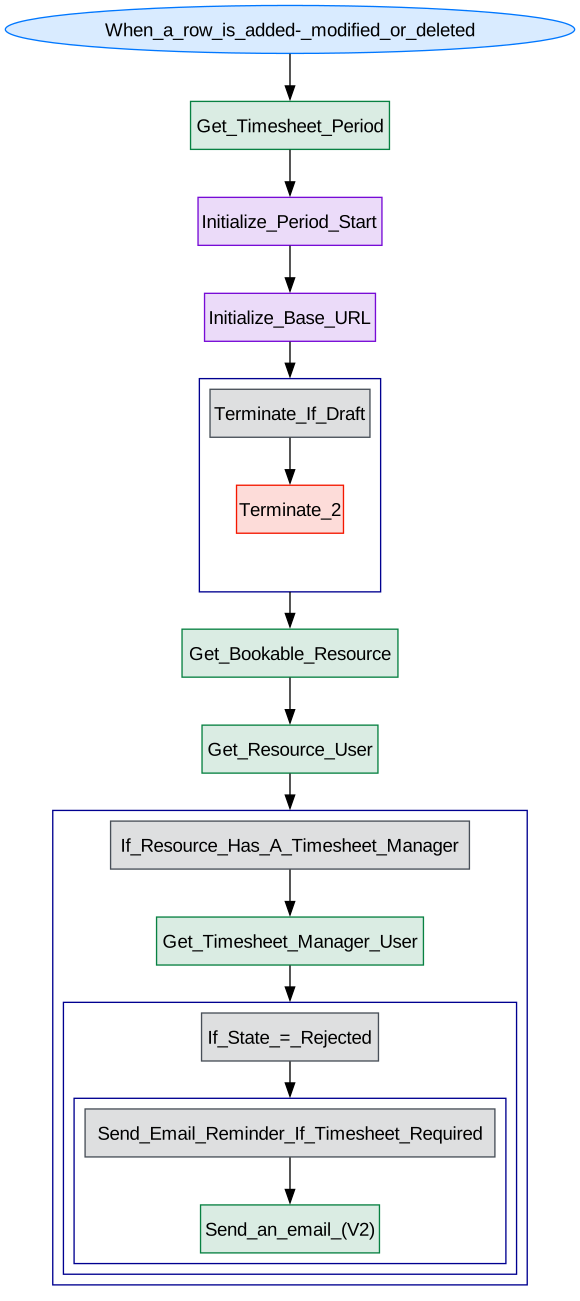
| Unsubmitted timesheet reminder | Sends an automated email to each active user who is required to complete a timesheet who hasn't submitted one for the selected week. |
| Submit for Approval Notification | Sends a notification to the timesheet manager when a timesheet is submitted for approval. |
| Timesheet rejection notification | Sends an automated email to the active user to advise them that their timesheet has been rejected. |
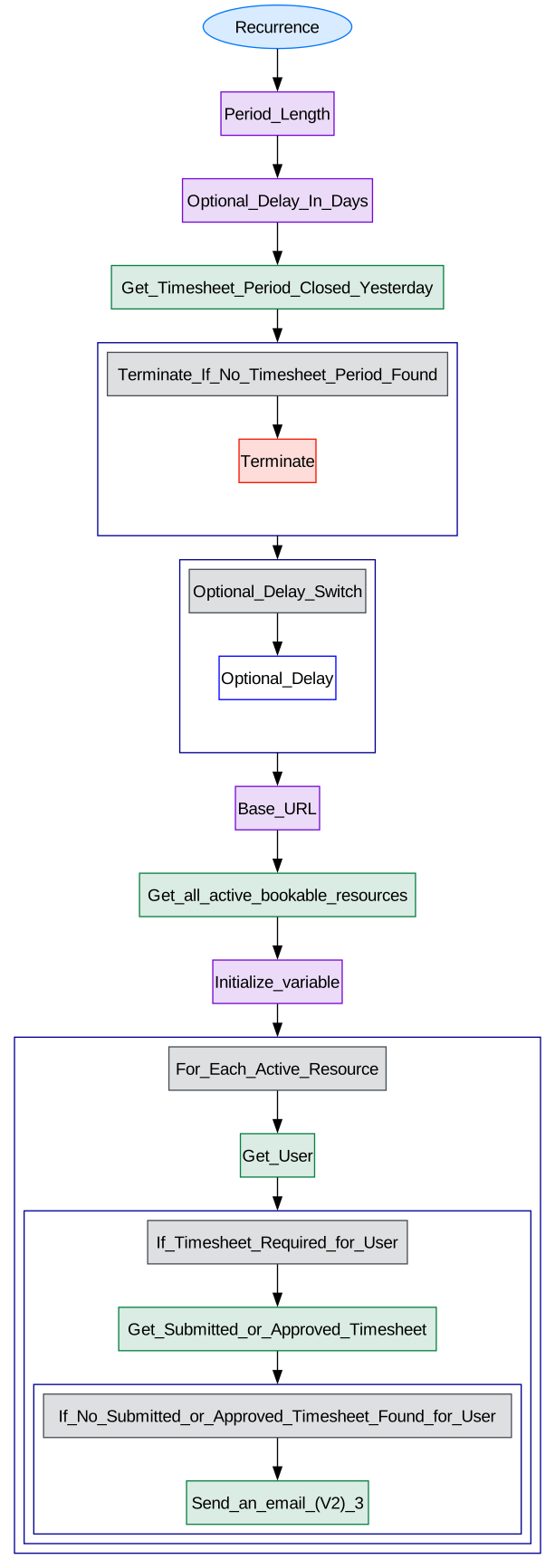
Unsubmitted Timesheet Reminder
Sends an automated email to each active user who is required to complete a timesheet who hasn't submitted one for the selected week.
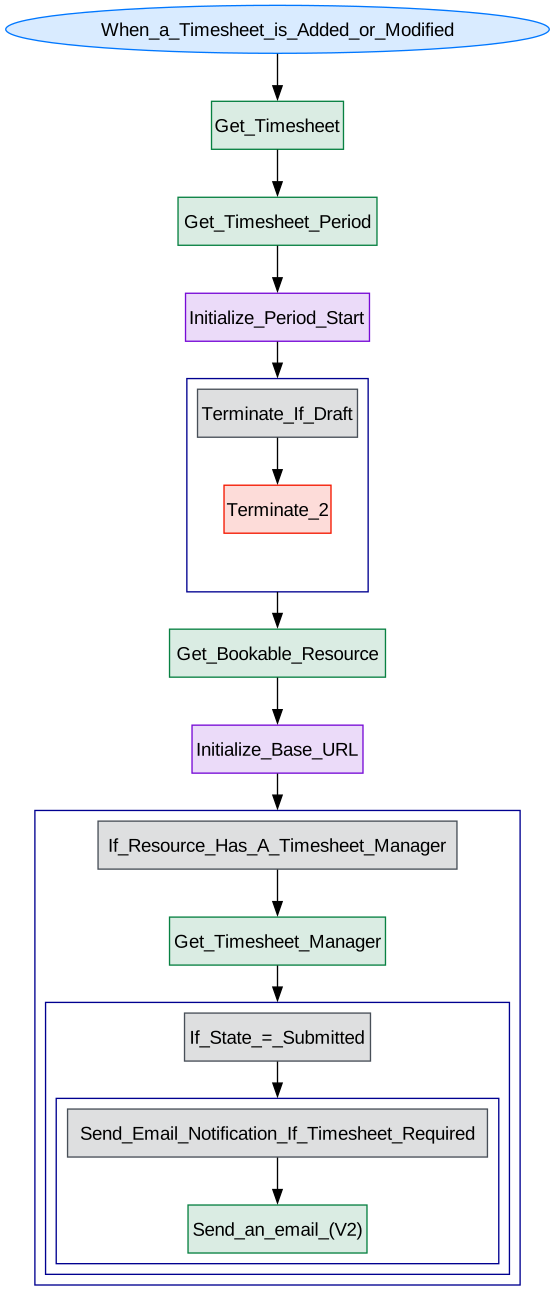
Submit for approval notification
Sends a notification to the timesheet manager when a timesheet is submitted for approval.
Timesheet rejection notification
Sends an automated email to the active user to advise them that their timesheet has been rejected.
Timesheet Settings
The settings for user timesheets can be set via the Altus Administrator via Configuration Settings
Security Roles
Security Roles for Timesheet Period
| Security Role | Create | Read | Write | Delete | Append | Append To | Assign | Share |
|---|---|---|---|---|---|---|---|---|
| Altus - PMO User |  |
 |
|
|
|
|
|
|
| Altus - Portfolio Manager | |
|
|
|
|
|
|
|
| Altus - Program Manager | |
|
|
|
|
|
|
|
| Altus - Proposal Manager | |
|
|
|
|
|
|
|
| Altus - Resource Manager | |
|
|
|
|
|
|
|
| Altus - Strategy Executive | |
|
|
|
|
|
|
|
| Altus - Timesheet Manager | |
|
|
|
|
|
|
|
| Altus Admin User | |
|
|
|
|
|
|
|
| Altus Portfolio User | |
|
|
|
|
|
|
|
| Altus Project Executive | |
|
|
|
|
|
|
|
| Altus Project User | |
|
|
|
|
|
|
|
| Altus Strategy User | |
|
|
|
|
|
|
|
Legend
 Organisation / Global
 Business Unit / Local
 User / Basic
 None
None
For details see Application Security.
Security Roles for Timesheet
| Security Role | Create | Read | Write | Delete | Append | Append To | Assign | Share |
|---|---|---|---|---|---|---|---|---|
| Altus - PMO User |  |
|
|
|
|
|
|
|
| Altus - Portfolio Manager | |
|
|
|
|
|
|
|
| Altus - Program Manager | |
|
|
|
|
|
|
|
| Altus - Proposal Manager | |
|
|
|
|
|
|
|
| Altus - Resource Manager | |
|
|
|
|
|
|
|
| Altus - Strategy Executive | |
|
|
|
|
|
|
|
| Altus - Timesheet Manager | |
|
|
|
|
|
|
|
| Altus Admin User | |
|
|
|
|
|
|
|
| Altus Portfolio User | |
|
|
|
|
|
|
|
| Altus Project Executive | |
|
|
|
|
|
|
|
| Altus Project User | |
|
|
|
|
|
|
|
| Altus Strategy User | |
|
|
|
|
|
|
|
Legend
- Organisation / Global
- Business Unit / Local
- User / Basic
- None
For details see Application Security.
Security Roles for Timesheet Row
| Security Role | Create | Read | Write | Delete | Append | Append To | Assign | Share |
|---|---|---|---|---|---|---|---|---|
| Altus - PMO User | |
|
|
|
|
|
|
|
| Altus - Portfolio Manager | |
|
|
|
|
|
|
|
| Altus - Program Manager | |
|
|
|
|
|
|
|
| Altus - Proposal Manager | |
|
|
|
|
|
|
|
| Altus - Resource Manager | |
|
|
|
|
|
|
|
| Altus - Strategy Executive | |
|
|
|
|
|
|
|
| Altus - Timesheet Manager | |
|
|
|
|
|
|
|
| Altus Admin User | |
|
|
|
|
|
|
|
| Altus Portfolio User | |
|
|
|
|
|
|
|
| Altus Project Executive | |
|
|
|
|
|
|
|
| Altus Project User | |
|
|
|
|
|
|
|
| Altus Strategy User | |
|
|
|
|
|
|
|
Legend
- Organisation / Global
- Business Unit / Local
- User / Basic
- None
For details see Application Security.
Security Roles for Timesheet Data
| Security Role | Create | Read | Write | Delete | Append | Append To | Assign | Share |
|---|---|---|---|---|---|---|---|---|
| Altus - PMO User | |
|
|
|
|
|
|
|
| Altus - Portfolio Manager | |
|
|
|
|
|
|
|
| Altus - Program Manager | |
|
|
|
|
|
|
|
| Altus - Proposal Manager | |
|
|
|
|
|
|
|
| Altus - Resource Manager | |
|
|
|
|
|
|
|
| Altus - Strategy Executive | |
|
|
|
|
|
|
|
| Altus - Timesheet Manager | |
|
|
|
|
|
|
|
| Altus Admin User | |
|
|
|
|
|
|
|
| Altus Portfolio User | |
|
|
|
|
|
|
|
| Altus Project Executive | |
|
|
|
|
|
|
|
| Altus Project User | |
|
|
|
|
|
|
|
| Altus Strategy User | |
|
|
|
|
|
|
|
Legend
- Organisation / Global
- Business Unit / Local
- User / Basic
- None
For details see Application Security.
Security Roles for Non Project Time
| Security Role | Create | Read | Write | Delete | Append | Append To | Assign | Share |
|---|---|---|---|---|---|---|---|---|
| Altus - PMO User | |
|
|
|
|
|
|
|
| Altus - Portfolio Manager | |
|
|
|
|
|
|
|
| Altus - Program Manager | |
|
|
|
|
|
|
|
| Altus - Proposal Manager | |
|
|
|
|
|
|
|
| Altus - Resource Manager | |
|
|
|
|
|
|
|
| Altus - Strategy Executive | |
|
|
|
|
|
|
|
| Altus - Timesheet Manager | |
|
|
|
|
|
|
|
| Altus Admin User | |
|
|
|
|
|
|
|
| Altus Portfolio User | |
|
|
|
|
|
|
|
| Altus Project Executive | |
|
|
|
|
|
|
|
| Altus Project User | |
|
|
|
|
|
|
|
| Altus Strategy User | |
|
|
|
|
|
|
|
Legend
- Organisation / Global
- Business Unit / Local
- User / Basic
- None
For details see Application Security.
Dataverse Tables
The diagram below covers off how the timesheet dataverse tables relate to each other to capture timesheet effort for bookable resources:
| Timesheet | Timesheet with fields |
|---|