Issues
Overview
Issues refer to challenges, obstacles, or problems that arise during the course of a project that may impede its progress, success, or the achievement of its objectives. Identifying, managing, and resolving these issues is a crucial aspect of project management. Altus also enables Program Managers to track issues against their programs. Examples include:
- Scope Creep: Definition: The expansion of project scope beyond its original boundaries without corresponding adjustments to time, budget, or resources. Impact: Can lead to delays, increased costs, and potential failure to meet project objectives.
- Timeline Delays: Definition: Deviations from the planned project schedule, often due to unforeseen obstacles or poor time management. Impact: Disruption of subsequent project activities, potential financial implications, and dissatisfaction among stakeholders.
- Budget Overruns: Definition: Exceeding the allocated budget for the project. Impact: Financial strain, potential resource reallocation, and increased risk of project failure.
- Quality Issues: Definition: Deviations from established quality standards or the discovery of defects in project deliverables. Impact: Rework, project delays, and potential damage to the project's reputation.
Usage in Altus
Issues can be tracked in the following places in Altus:
Views
There are two types of views for Issues in Altus:
- User Views: These views show all items assigned to the current user. In addition, users with higher levels of access can view items across the portfolio.
- Object Views: These filter items based on which portfolio, program, or project they belong to automatically.
User Views

| View | Columns | Filters |
|---|---|---|
| My Active Issues | ID; Name; Assigned To; Due Date; Priority; Category; Status Reason; Project; Program; Portfolio | Assigned to = Current User AND Status Reason = Active |
| All Active Issues | ID; Name; Assigned To; Due Date; Priority; Category; Status Reason; Project; Program; Portfolio | Status Reason = Active |
| All Closed Issues | ID; Name; Assigned To; Due Date; Priority; Category; Status Reason; Project; Program; Portfolio | Status Reason = Closed |
| All Issues | ID; Name; Assigned To; Due Date; Priority; Category; Status Reason; Project; Program; Portfolio | None |
Object Views
These show items filtered within the context of the object. For example, the project issues view below only shows issues that are linked to that project.


Item Form
There are two types of items forms in Altus:
- Quick Create: This is a simple version used to create the item.
- View/Edit: Provides a full browser width version containing all fields and features.
Quick Create form

View / Edit Form

Columns
The following columns exists in Altus.
Columns prefixed with sensei_ are those that form part of the Altus solution.
The remaining are default dataverse fields created automatically.
| Property | Value |
|---|---|
| Display Name | Issue |
| Name | sensei_issue |
| Primary Column | Name |
| Description |
| Display Name | Name | Data type | Field Length | Customizable | Required | Searchable |
|---|---|---|---|---|---|---|
| Assigned To | sensei_AssignedTo |
Lookup | True | False | False | |
| Category | sensei_Category |
picklist | True | False | False | |
| Cost Impact | sensei_CostImpact |
Currency | True | False | False | |
| Cost Impact (Base) | sensei_costimpact_Base |
Currency | True | False | False | |
| Created By | CreatedBy |
Lookup | True | False | False | |
| Created By (Delegate) | CreatedOnBehalfBy |
Lookup | True | False | False | |
| Created On | CreatedOn |
Date and Time | Date and Time | True | False | False |
| Currency | TransactionCurrencyId |
Lookup | True | False | False | |
| Description | sensei_Description |
Multiple lines of text | 4096 | True | False | False |
| Due Date | sensei_DueDate |
Date and Time | Date Only | True | False | False |
| Exchange Rate | ExchangeRate |
Decimal | True | False | False | |
| ID | sensei_ID |
Single line of text | 100 | True | False | False |
| Import Sequence Number | ImportSequenceNumber |
Whole number | True | False | False | |
| Include in Program Report | sensei_includeinprogramreport |
Yes/No | True | False | False | |
| Include in PSR | sensei_includeinpsr |
Yes/No | True | False | False | |
| Issue | sensei_issueId |
Primary Key | True | False | False | |
| Modified By | ModifiedBy |
Lookup | True | False | False | |
| Modified By (Delegate) | ModifiedOnBehalfBy |
Lookup | True | False | False | |
| Modified On | ModifiedOn |
Date and Time | Date and Time | True | False | False |
| Name (Primary name column) | sensei_name |
Single line of text | 500 | True | True | True |
| Owner | OwnerId |
Owner | True | False | False | |
| Owning Business Unit | OwningBusinessUnit |
Lookup | True | False | False | |
| Owning Team | OwningTeam |
Lookup | True | False | False | |
| Owning User | OwningUser |
Lookup | True | False | False | |
| Portfolio | sensei_Portfolio |
Lookup | True | False | False | |
| Priority | sensei_Priority |
picklist | True | False | False | |
| Program | sensei_Program |
Lookup | True | False | False | |
| Project | sensei_project |
Lookup | True | False | False | |
| Record Created On | OverriddenCreatedOn |
Date and Time | Date Only | True | False | False |
| Resolution | sensei_Resolution |
Multiple lines of text | 2000 | True | False | False |
| Schedule Impact | sensei_ScheduleImpact |
Whole number | True | False | True | |
| Status | statecode |
Choice | True | False | False | |
| Status Reason | statuscode |
Choice | True | False | False | |
| Time Zone Rule Version Number | TimeZoneRuleVersionNumber |
Whole number | -1 to 2147483647 | True | False | False |
| UTC Conversion Time Zone Code | UTCConversionTimeZoneCode |
Whole number | -1 to 2147483647 | True | False | False |
Issue Category (sensei_issuecategory)
| Value | Label | Description |
|---|---|---|
955000000 |
Resource | |
955000001 |
Scope | |
955000002 |
Schedule | |
955000003 |
Technology | |
955000004 |
Business Process | |
955000005 |
Vendor | |
955000006 |
Management Escalation | |
955000007 |
Other |
Issue Priority (sensei_issuepriority)
| Value | Label | Description |
|---|---|---|
1 |
High | |
2 |
Medium | |
3 |
Low |
Security Roles
| Security Role | Create | Read | Write | Delete | Append | Append To | Assign | Share |
|---|---|---|---|---|---|---|---|---|
| Altus - PMO User |  |
|
|
|
|
|
|
|
| Altus - Portfolio Manager |  |
 |
|
|
|
|
|
|
| Altus - Portfolio Manager - Team | |
|
|
|
|
|
|
|
| Altus - Program Manager | |
|
|
|
|
|
|
|
| Altus - Program Manager - Team | |
|
|
|
|
|
|
|
| Altus - Strategy Executive |  |
|
|
|
|
|
|
|
| Altus Admin User | |
|
|
|
|
|
|
|
| Altus Portfolio User | |
|
|
|
|
|
|
|
| Altus Project Executive | |
|
|
|
|
|
|
|
| Altus Project User | |
|
|
|
|
|
|
|
| Altus Strategy User | |
|
|
|
|
|
|
|
Legend
 Organisation / Global
 Business Unit / Local
 User / Basic
 None
None
For details see Application Security.
Dataverse Tables
| Register Issue | Register Issue with fields |
|---|
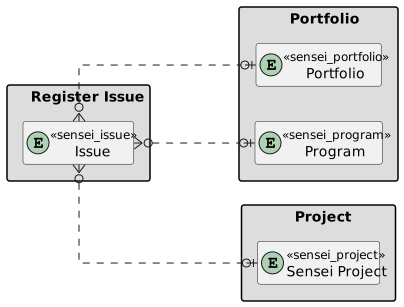
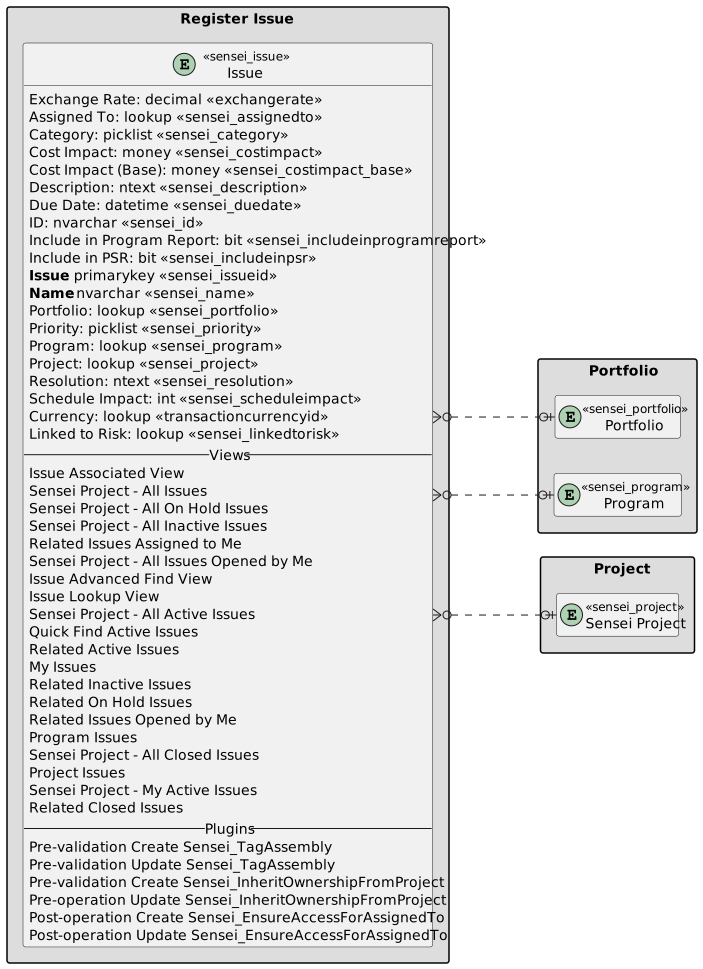
Linked to Risk
Issues can be linked to Risks for reporting and tracking purposes. This is a useful feature to trace back to see the risk that was flagged ahead of the issue.
