Risks
Overview
Identifying and managing project risks is a critical aspect of project management. Risks are potential events or situations that can have a negative impact on the project's objectives. Examples of risks include:
- Schedule: Definition: Factors that may cause delays or disruptions in the project timeline. Examples: Unforeseen dependencies, resource shortages, or unexpected changes in project requirements. Impact: Delayed project completion, potential conflicts with other projects.
- Technology: Definition: Challenges related to the adoption, integration, or failure of technology. Examples: Technical complexities, compatibility issues, or the unavailability of necessary tools. Impact: Delays, increased costs, and potential disruptions in project workflows.
- Stakeholders: Definition: Risks associated with the expectations, engagement, and collaboration of project stakeholders. Examples: Conflicting stakeholder interests, communication breakdowns. Impact: Delays in decision-making, scope changes, and increased project complexity.
Usage in Altus
Risks can be tracked in the following places in Altus:
Views
There are two types of views for Risks in Altus:
- User Views: These views show all items assigned to the current user. In addition, users with higher levels of access can view items across the portfolio.
- Object Views: These filter items based on which portfolio, program, or project they belong to automatically.
User Views

| View | Columns | Filters |
|---|---|---|
| My Active Risks | ID; Name; Assigned To; Due Date; Risk Score; Category; Status Reason; Project; Program; Portfolio | Assigned to = Current User AND Status Reason = Active |
| All Active Risks | ID; Name; Assigned To; Due Date; Risk Score; Category; Status Reason; Project; Program; Portfolio | Status Reason = Active |
| All Closed Risks | ID; Name; Assigned To; Due Date; Risk Score; Category; Status Reason; Project; Program; Portfolio | Status Reason = Closed OR Converted to Issue |
| All Converted to Issue Risks | ID; Name; Assigned To; Due Date; Risk Score; Category; Status Reason; Project; Program; Portfolio | Status Reason = Converted to Issue |
| All Risks | ID; Name; Assigned To; Due Date; Risk Score; Category; Status Reason; Project; Program; Portfolio | None |
Object Views
These show items filtered within the context of the object. For example, the project Risks view below only shows Risks that are linked to that project.
Portfolio

Program

Project

Item Form
There are two types of items forms in Altus:
- Quick Create: This is a simple version used to create the item.
- Edit: Provides a full browser width version containing all fields and features.
Quick Create form

Edit Form

Risk Matrix
The Risks Register in Altus includes a Risk Matrix. This provides a visualisation and summarisation of the risks for the selected project, program, or portfolio. Risks are plotted according to their Consequence and Likelihood (set on a risk-by-risk basis in the form).
- Consequence: Is the result if the risk occurs.
- Likelihood: Is the chance of the risk occurring.
- Risk Rating: Is the result of the Consequence and Likelihood and is represented by the colour background squares in the matrix.

The values and dimensions of the risk matrix can be configured to suit the organisation specific values. Please speak to your Partner if you wish these to be configured.
Using the Matrix on other lists
The Risk Matrix can be implemented to other lists/registers. Added capability to present labelled axis and to filter based on selected grid cell. Below is an example of this being implemented in the Decisions register. If you're interested in extending your Altus capability, please speak to your Partner if you wish these to be configured.

Columns
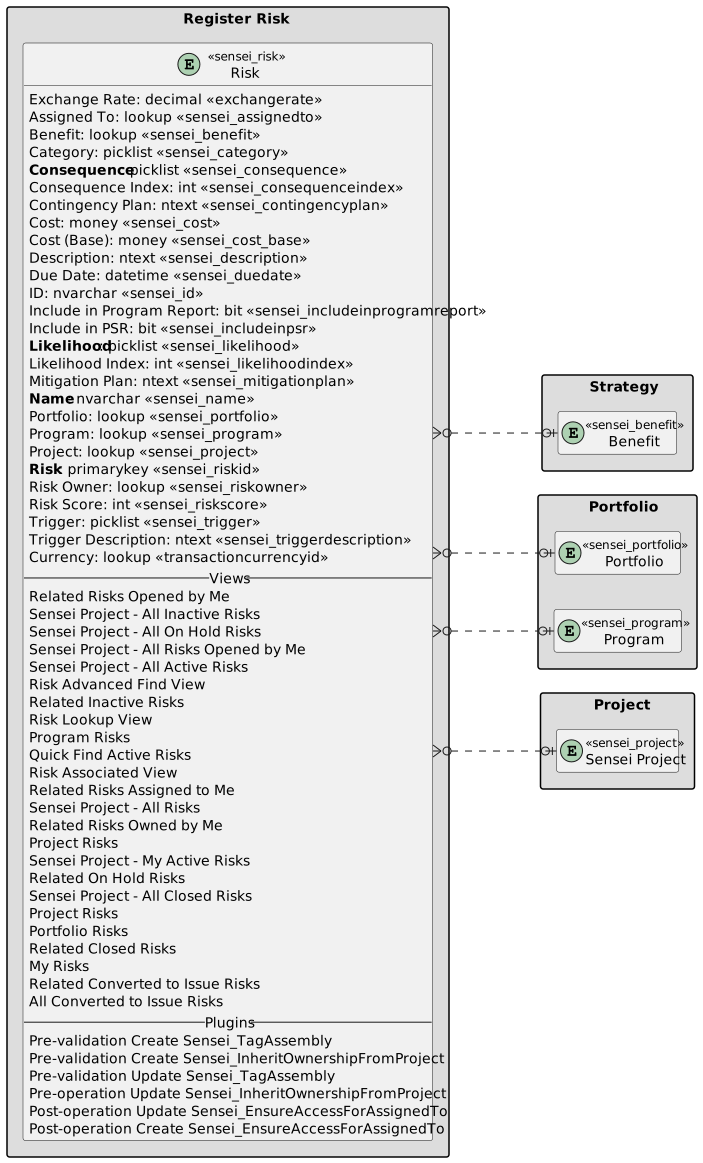
The following columns exists in Altus.
Columns prefixed with sensei_ are those that form part of the Altus solution.
The remaining are default dataverse fields created automatically.
| Property | Value |
|---|---|
| Display Name | Risk |
| Name | sensei_risk |
| Primary Column | Name |
| Description |
| Display Name | Name | Data type | Field Length | Customizable | Required | Searchable |
|---|---|---|---|---|---|---|
| Assigned To | sensei_AssignedTo |
Lookup | True | False | False | |
| Benefit | sensei_benefit |
Lookup | True | False | False | |
| Category | sensei_Category |
picklist | True | False | False | |
| Consequence | sensei_Consequence |
picklist | True | True | False | |
| Consequence Index | sensei_consequenceindex |
Whole number | True | False | True | |
| Contingency Plan | sensei_ContingencyPlan |
Multiple lines of text | 2000 | True | False | False |
| Cost | sensei_Cost |
Currency | True | False | False | |
| Cost (Base) | sensei_cost_Base |
Currency | True | False | False | |
| Created By | CreatedBy |
Lookup | True | False | False | |
| Created By (Delegate) | CreatedOnBehalfBy |
Lookup | True | False | False | |
| Created On | CreatedOn |
Date and Time | Date and Time | True | False | False |
| Currency | TransactionCurrencyId |
Lookup | True | False | False | |
| Description | sensei_Description |
Multiple lines of text | 2000 | True | False | False |
| Due Date | sensei_DueDate |
Date and Time | Date Only | True | False | False |
| Exchange Rate | ExchangeRate |
Decimal | True | False | False | |
| ID | sensei_ID |
Single line of text | 100 | True | False | False |
| Import Sequence Number | ImportSequenceNumber |
Whole number | True | False | False | |
| Include in Program Report | sensei_includeinprogramreport |
Yes/No | True | False | False | |
| Include in PSR | sensei_includeinpsr |
Yes/No | True | False | False | |
| Likelihood | sensei_Likelihood |
picklist | True | True | False | |
| Likelihood Index | sensei_likelihoodindex |
Whole number | True | False | True | |
| Mitigation Plan | sensei_MitigationPlan |
Multiple lines of text | 2000 | True | False | False |
| Modified By | ModifiedBy |
Lookup | True | False | False | |
| Modified By (Delegate) | ModifiedOnBehalfBy |
Lookup | True | False | False | |
| Modified On | ModifiedOn |
Date and Time | Date and Time | True | False | False |
| Name (Primary name column) | sensei_name |
Single line of text | 500 | True | True | True |
| Owner | OwnerId |
Owner | True | False | False | |
| Owning Business Unit | OwningBusinessUnit |
Lookup | True | False | False | |
| Owning Team | OwningTeam |
Lookup | True | False | False | |
| Owning User | OwningUser |
Lookup | True | False | False | |
| Portfolio | sensei_Portfolio |
Lookup | True | False | False | |
| Program | sensei_Program |
Lookup | True | False | False | |
| Project | sensei_project |
Lookup | True | False | False | |
| Record Created On | OverriddenCreatedOn |
Date and Time | Date Only | True | False | False |
| Risk | sensei_riskId |
Primary Key | True | False | False | |
| Risk Owner | sensei_RiskOwner |
Lookup | True | False | False | |
| Risk Score | sensei_riskscore |
Whole number | True | False | True | |
| Status | statecode |
Choice | True | False | False | |
| Status Reason | statuscode |
Choice | True | False | False | |
| Time Zone Rule Version Number | TimeZoneRuleVersionNumber |
Whole number | -1 to 2147483647 | True | False | False |
| Trigger | sensei_Trigger |
picklist | True | False | False | |
| Trigger Description | sensei_TriggerDescription |
Multiple lines of text | 2000 | True | False | False |
| UTC Conversion Time Zone Code | UTCConversionTimeZoneCode |
Whole number | -1 to 2147483647 | True | False | False |
Risk Category (sensei_riskcategory)
| Value | Label | Description |
|---|---|---|
955000000 |
Resource | |
955000001 |
Scope | |
955000002 |
Schedule | |
955000003 |
Technology | |
955000004 |
Business Process | |
955000005 |
Vendor | |
955000006 |
Management Escalation | |
955000007 |
Other |
Risk Consequence (sensei_riskconsequence)
| Value | Label | Description |
|---|---|---|
955000000 |
Negligible | |
955000001 |
Minor | |
955000002 |
Moderate | |
955000003 |
Major | |
955000004 |
Severe |
Risk Likelihood (sensei_risklikelihood)
| Value | Label | Description |
|---|---|---|
955000000 |
Rare | |
955000001 |
Unlikely | |
955000002 |
Possible | |
955000003 |
Likely | |
955000004 |
Almost Certain |
Risk Trigger (sensei_risktrigger)
| Value | Label | Description |
|---|---|---|
955000000 |
Date | |
955000001 |
Exposure over threshold | |
955000002 |
Tasks not completed | |
955000003 |
Other |
Security Roles
| Security Role | Create | Read | Write | Delete | Append | Append To | Assign | Share |
|---|---|---|---|---|---|---|---|---|
| Altus - PMO User |  |
|
|
|
|
|
|
|
| Altus - Portfolio Manager |  |
 |
|
|
|
|
|
|
| Altus - Portfolio Manager - Team | |
|
|
|
|
|
|
|
| Altus - Program Manager | |
|
|
|
|
|
|
|
| Altus - Program Manager - Team | |
|
|
|
|
|
|
|
| Altus - Strategy Executive |  |
|
|
|
|
|
|
|
| Altus Admin User | |
|
|
|
|
|
|
|
| Altus Portfolio User | |
|
|
|
|
|
|
|
| Altus Project Executive | |
|
|
|
|
|
|
|
| Altus Project User | |
|
|
|
|
|
|
|
| Altus Strategy User | |
|
|
|
|
|
|
|
Legend
 Organisation / Global
 Business Unit / Local
 User / Basic
 None
None
For details see Application Security.
Dataverse Tables
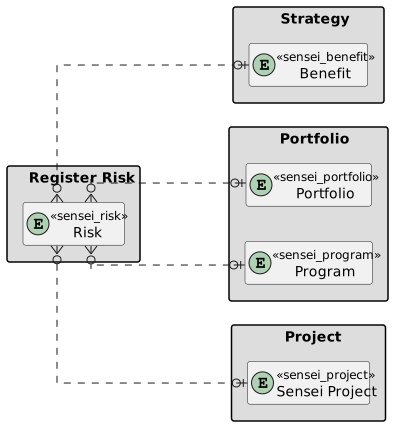
| Register Risk | Register Risk with fields |
|---|